How to Pick a Channel Code Nobody Will Guess
A private room on Walkie Talkie HRL is locked by two things: a channel code and a six-digit passcode. The passcode gets most of the attention, but the channel code matters just as much, because it's often the first thing a new member types in, and the first thing a careless post or sign-up sheet leaks. Pick a weak one and you've left a door half-open no matter how good the lock is. Here's how to choose a channel code that does its job quietly, without making life harder for the people who actually belong in the room.
Why the Channel Code Is Part of Your Privacy, Not Just a Label
It's tempting to treat a channel code like a room number at a hotel: convenient, memorable, not especially secret. But a channel code that's easy to guess narrows down the search for anyone trying to find your room, even before they get to the passcode. Private channels are built around the pair working together, so a code that's hard to stumble on and a passcode that's hard to guess combine into something much stronger than either alone.
What Makes a Channel Code Weak
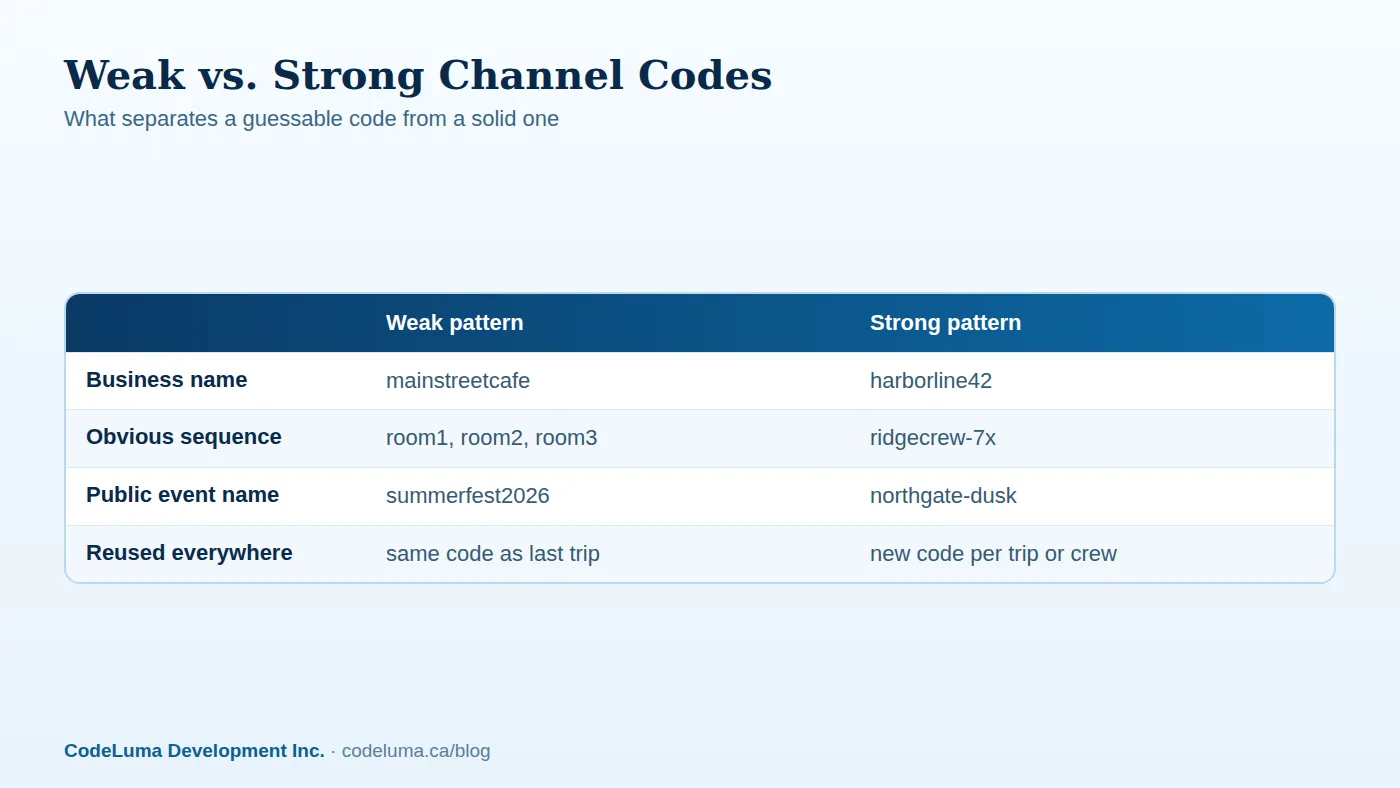
Most weak codes fall into a few predictable categories: the name of your business, the name of the event, a street address, or a simple sequence like room1, room2, room3. These are weak not because they're short, but because they're the first things a stranger would try. If your code is printed on a sign out front, posted in a public event listing, or just your company name with no variation, you've handed over half the puzzle before anyone even has to guess.
The Rules of a Strong Channel Code
A good channel code follows a few simple rules:
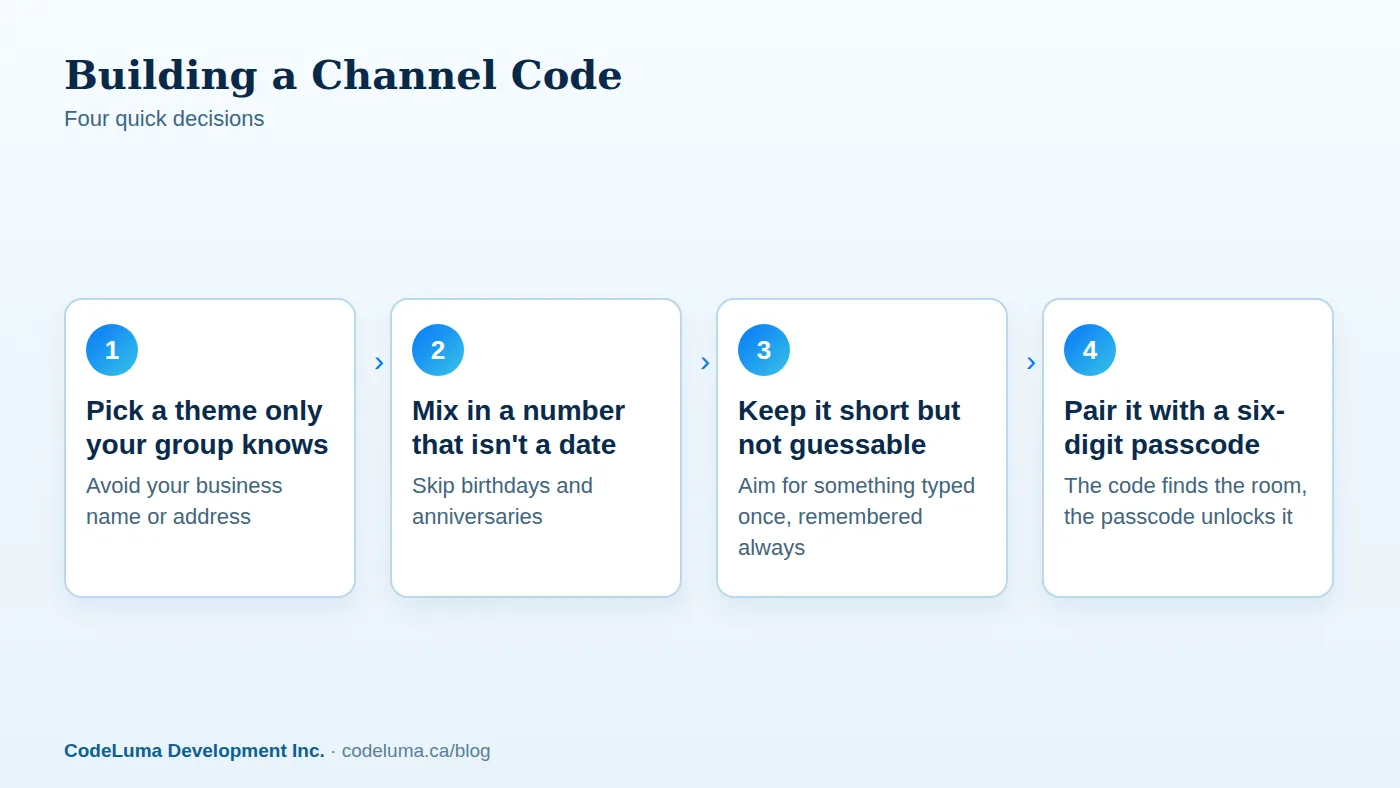
- Don't use anything public. Skip business names, event titles, addresses, or anything printed on a flyer.
- Avoid dates and obvious sequences. Birthdays, anniversaries, and "room1" patterns are the first things people try.
- Combine two unrelated words or a word and a number. Something like "harborline42" is easy to say over the phone and hard to guess cold.
- Keep it pronounceable. You'll be reading it aloud or texting it to people, so avoid strings that are painful to transcribe.
- Treat it as temporary. A code you plan to retire after a trip or a shift doesn't need to be memorized for life.
Step-by-Step: Choosing a Code in Under a Minute
You don't need a long process. Pick a theme only your group would think of, mix in a number that isn't a date, and check that it isn't something printed anywhere public. That's it. The goal isn't complexity, it's avoiding the obvious. The same logic applies to your six-digit passcode, which is the second half of keeping a room closed to outsiders.
Don't Forget the Six-Digit Passcode
The channel code gets someone to the door. The six-digit passcode is what actually lets them in. Don't reuse the same passcode across every room you create, and don't pick something tied to a date or an obviously repeated pattern. A new passcode for a new room, or a refreshed one after a trip wraps up, keeps old members from wandering back in without you realizing it.
Who Should Get the Code (and Who Shouldn't)
Share the channel code and passcode only with people who genuinely need to be in the room. That sounds obvious, but it's where most leaks start: a code pasted into a group chat with people outside the group, or left visible in a screenshot. For security teams and work crews, this usually means sharing it verbally or through a single trusted channel, not broadcasting it anywhere that outlives the shift.
A Quick Checklist Before You Share
- Is the code free of your business name, event name, or address?
- Have you avoided dates, birthdays, and simple sequences?
- Is the passcode different from ones you've used in other rooms?
- Are you sharing both only with people who need to be in the room?
- Do you have a plan to remove people when they no longer need access?
- Will you retire this code and passcode once the trip, shift, or event ends?
Common Mistakes That Undo a Good Code
Even a well-chosen code gets weakened by habits around it. Pasting it into a public social post, printing it on a flyer meant for a different audience, or reusing the same code and passcode for every room you ever create are the three most common slips. Another is assuming a clever code means you never have to think about who's in the room; a code keeps strangers from wandering in, but it doesn't manage who stays once they're invited.
Changing Codes When People Leave
Owners can remove people from a private room, which matters, but it's not the only tool. When a crew rotates, a trip ends, or someone's access should simply expire, creating a fresh room with a new code and passcode is often cleaner than trying to track who still remembers the old one. Setting up a new private room takes very little time, so there's rarely a good reason to keep an old code alive out of convenience.
Different Rooms for Different Groups
If you manage more than one group, whether that's a security shift, a job site, or family members coordinating a trip, resist the urge to use one code for everything. Separate rooms with separate codes mean a leak in one doesn't expose the others, and it's easier to reason about exactly who has access to what. Keeping job talk job-only is as much about code hygiene as it is about room settings.
The Bottom Line
A channel code is a small decision that does a lot of quiet work. Avoid the obvious, pair it with a real passcode, share both only with people who need them, and retire the pair when the job is done. None of this requires special equipment or technical skill, just the same habits you'd use for any password worth protecting. Full details on setup and permissions are in the FAQ, and the how it works guide walks through joining a room for the first time.
Try Walkie Talkie HRL
Ready to set up a room only your people can find? Download Walkie Talkie HRL on the Android or iPhone you already carry, pick a channel code using the rules below, and add a six-digit passcode for a private room in minutes.
- Private channels - access-controlled rooms with a channel code and six-digit passcode.
- How it works - install, allow audio, join a channel and hold to talk.
- Questions and answers - compatibility, accounts, rooms and audio.
- Security teams - patrol, venue and hospital communication.
Private, instant and already in your pocket. Walkie Talkie HRL turns the phone you already own into a push-to-talk walkie-talkie. Voice is encrypted in transit; no online service can promise absolute security. It is not an emergency-calling service.