
Guard Offboarding: Rotate Your Passcode the Right Way

A guard who finishes their last shift does not automatically lose access to anything they were given earlier. If your patrol team talks on a private room with a channel code and a six-digit passcode, that passcode still works until someone changes it. Rotating it the day someone leaves is one of the simplest, most effective habits a security team can build.
Why a Departing Guard Still Has Access Until You Act
A six-digit passcode is just a number. It does not know who is typing it in. Once a guard has it memorized, written down, or saved in their phone, nothing about leaving the job erases it automatically. The passcode keeps working for anyone who has it, whether they still carry a badge or not. That is not a flaw in the system; it is simply how shared access codes behave everywhere, from building door codes to channel codes. The responsibility to close that access sits with whoever owns the room.
This is especially worth thinking about for security teams where shift turnover is routine. Guards rotate sites, change employers, or leave on short notice. Each departure is a small window where an old passcode could still open the same room your current patrol is using.

What Rotating a Passcode Actually Changes
Rotating the passcode means setting a new six-digit number for the room and sharing it only with the guards who should still have it. Anyone holding the old code is locked out the next time they try to join. It does not delete past conversations or affect the channel code identifying the room itself; it simply resets who can get in going forward.
This is a deliberately small, fast action. It does not require rebuilding the room, re-inviting everyone from scratch with new channel codes, or disrupting an active shift. It is a quick reset of one piece of information, done on purpose, right when it matters.
The Five-Minute Offboarding Routine
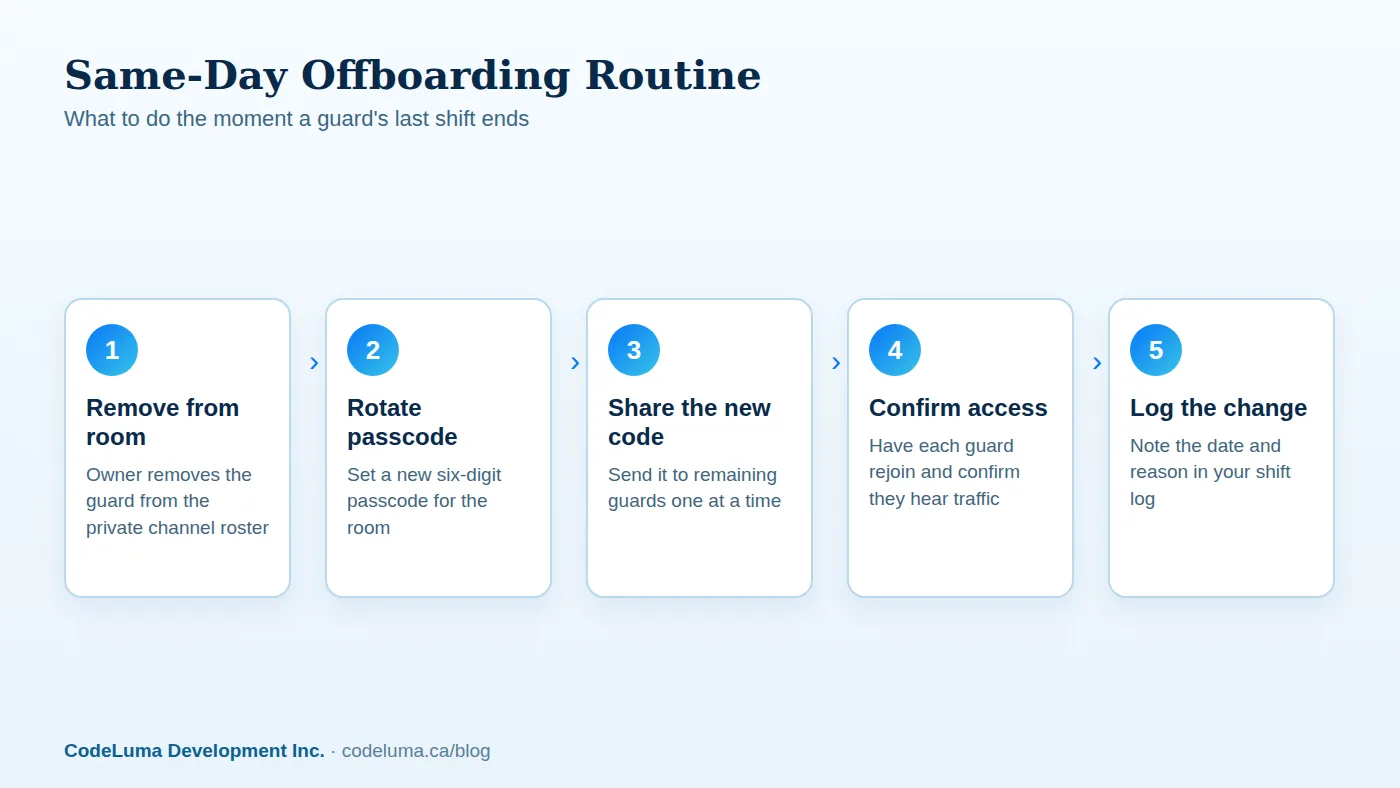
Most teams already have an offboarding checklist for badges, keys, and equipment. A private channel passcode deserves the same line item. The routine is short enough to finish before the next shift starts:
- Remove the departing guard from the room roster, if your plan supports managing participants directly.
- Set a new six-digit passcode for the room.
- Send the new passcode to each remaining guard individually, not in a group text or posted note.
- Confirm each guard has rejoined and can hear traffic normally.
- Log the date and reason for the change in your shift records.
Doing this the same day someone leaves, rather than "sometime this week," is what actually closes the gap. For more on getting a room ready in the first place, see how guards set up encrypted push-to-talk on the phones they already carry.
Removing the Person From the Room First
If your private room lets an owner remove a specific participant, do that before you even think about the passcode. Removal addresses the person directly tied to that device or session. Rotating the passcode afterward is what prevents that same person from simply typing the old code back in and rejoining later from another phone. The two steps work together: one closes the current session, the other closes the door for next time.
Choosing a New Passcode That Isn't a Repeat
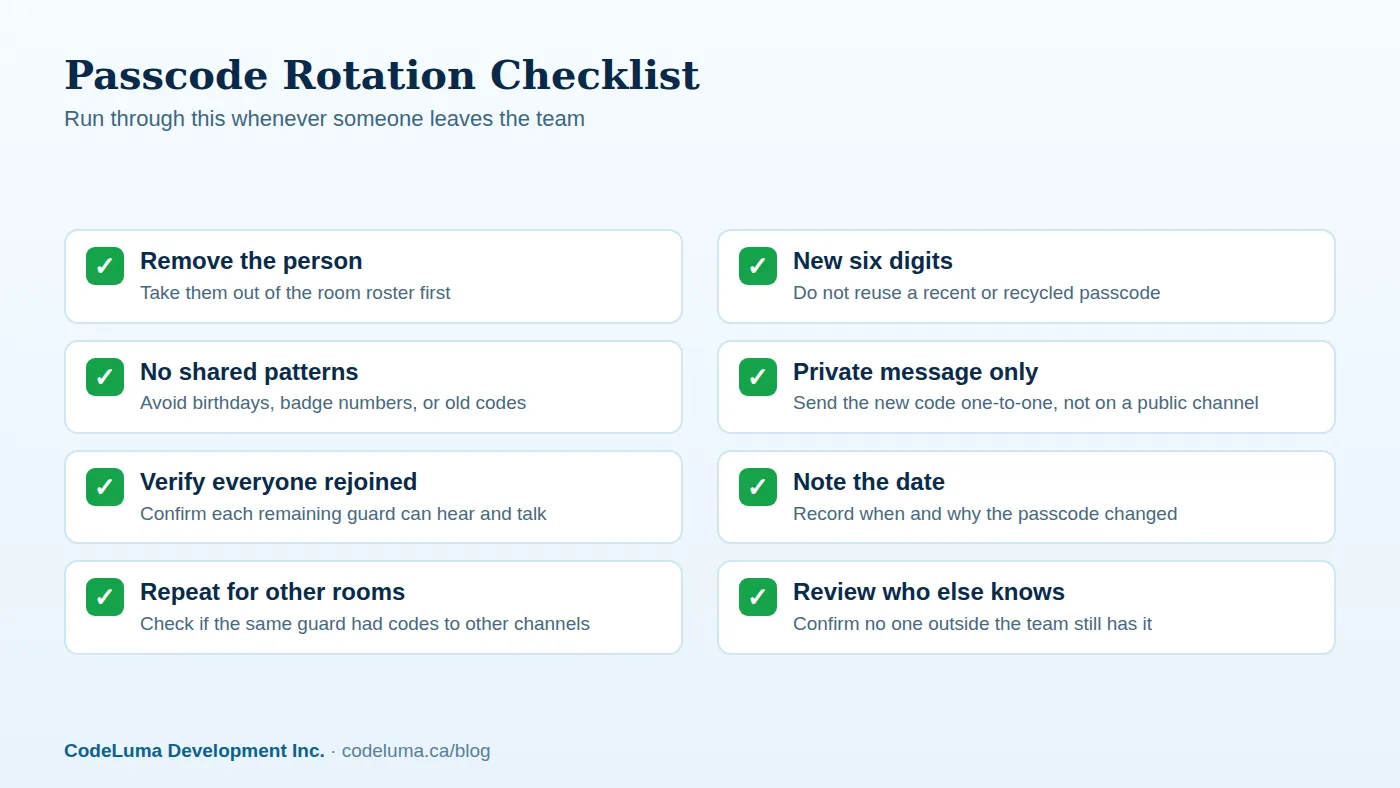
When it's time to set the new six-digit passcode, resist the urge to reuse something familiar. A passcode that is close to the old one, or one you've used for this room before, defeats the purpose of rotating it at all. Avoid birthdays, badge numbers, repeating digits, or any sequence a departing guard might reasonably guess after working alongside your team for months.
A genuinely new, non-obvious six-digit number takes seconds to generate and is far harder for anyone outside the current roster to stumble into. If you want a deeper walkthrough on picking strong codes in the first place, this guide to choosing a passcode strangers can't guess is worth a read, as is setting passcodes well for crew channels.
Telling the Rest of the Team Without Causing Panic
Changing a passcode after someone leaves does not need to be announced as a security incident. A short, calm message does the job: "Room passcode has been updated as part of standard offboarding. Here's the new code." Send it privately to each remaining guard rather than posting it anywhere the whole site, client, or public might see it. The goal is a routine administrative update, not an alarm.

Common Mistakes That Leave a Door Open
A few habits quietly undo the benefit of rotating a passcode:
- Waiting too long. Rotating a passcode a week after someone leaves gives them a full week of unnecessary access.
- Posting the new code publicly. Pinning it to a shared board or group chat defeats the purpose of a private room.
- Reusing old passcodes. Cycling back through two or three familiar numbers makes them easy to guess over time.
- Forgetting related rooms. A guard who worked multiple sites may have had codes to more than one room; rotating only one leaves the others open.
- Skipping the log. Without a record of when and why a passcode changed, it's hard to prove the team followed its own process later.
Building Rotation Into Your Standard Offboarding Checklist
The teams that handle this well treat passcode rotation like any other equipment return. It sits on the same checklist as collecting a radio, badge, or uniform, with a signature or checkbox confirming it was done. Once it's a standard line item rather than something someone has to remember to think of, it stops depending on any single supervisor's memory. Setting up that first private room correctly makes this much easier down the line; see how to create a private room in minutes if you're starting from scratch.
When to Rotate Even Without a Departure
A guard leaving isn't the only trigger. Consider rotating the passcode if a device with the code saved on it is lost or stolen, if a guard reports a client or visitor overheard the code, or simply on a regular schedule, such as every few months, as routine hygiene. Treat it the same way you'd treat rotating a physical key or access card after a similar event.
Wrap-Up
A six-digit passcode is only as useful as the discipline behind changing it. The moment a guard's last shift ends, that code should be the first thing on your offboarding list, not an afterthought. Remove the person from the room, set a new passcode, share it privately, and log the change. It takes a few minutes and closes a gap that otherwise stays open indefinitely. For more on how the room itself works day to day, check the FAQ or revisit how it works before your next shift change.
Try Walkie Talkie HRL
Keep your patrol channel tight by building passcode rotation into your offboarding routine. Open a {{svc:private|private room}} today, set a fresh six-digit passcode, and see {{svc:howto|how it works}} on the phone every guard already carries.
- Security teams - patrol, venue and hospital communication.
- Private channels - access-controlled rooms with a channel code and six-digit passcode.
- How it works - install, allow audio, join a channel and hold to talk.
- Questions and answers - compatibility, accounts, rooms and audio.
Private, instant and already in your pocket. Walkie Talkie HRL turns the phone you already own into a push-to-talk walkie-talkie. Voice is encrypted in transit; no online service can promise absolute security. It is not an emergency-calling service.