Six-Digit Passcodes for Crew Channels: Set Them Well

A private crew channel on Walkie Talkie HRL is only as private as its weakest habit, and that habit is usually the passcode. The channel code gets a room started, but the six-digit passcode is what keeps strangers out of it. Pick a strong one, share it the right way, and retire it when the job ends, and the room does what it's supposed to do: carry job talk to the people on the job, nobody else.
What the Channel Code and Passcode Actually Do
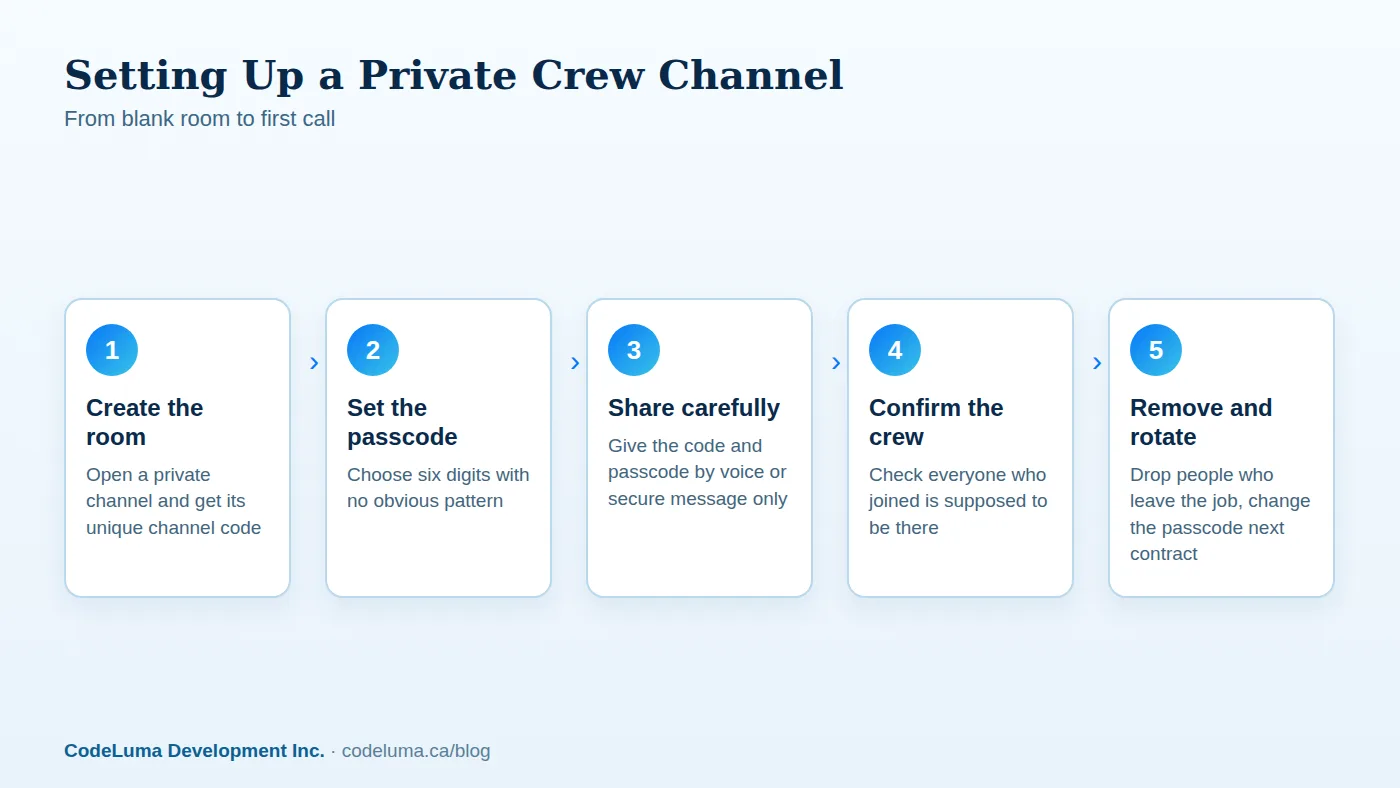
A private room uses two pieces together: a unique channel code that identifies the room, and a six-digit passcode that controls who's allowed to actually join it. Think of the channel code as the room's address and the passcode as its lock. Someone could know the address and still not get in without the correct six digits. This two-part setup is the core of how private channels work, and it's why a private room is a meaningfully different thing than a general open channel that anyone can wander into.

Why a Weak Passcode Undoes the Privacy
Encryption in transit protects the voice while it travels. The passcode protects who gets to hear it in the first place. If the passcode is something easy to guess, like 111111 or a date everyone on the crew already knows, you've built a locked door and left the key under the mat. A weak passcode doesn't make the encryption weaker, but it makes the privacy of the room weaker, because the wrong person simply walks in the front door instead of trying to pick a lock.
Picking a Six-Digit Passcode That Isn't Guessable
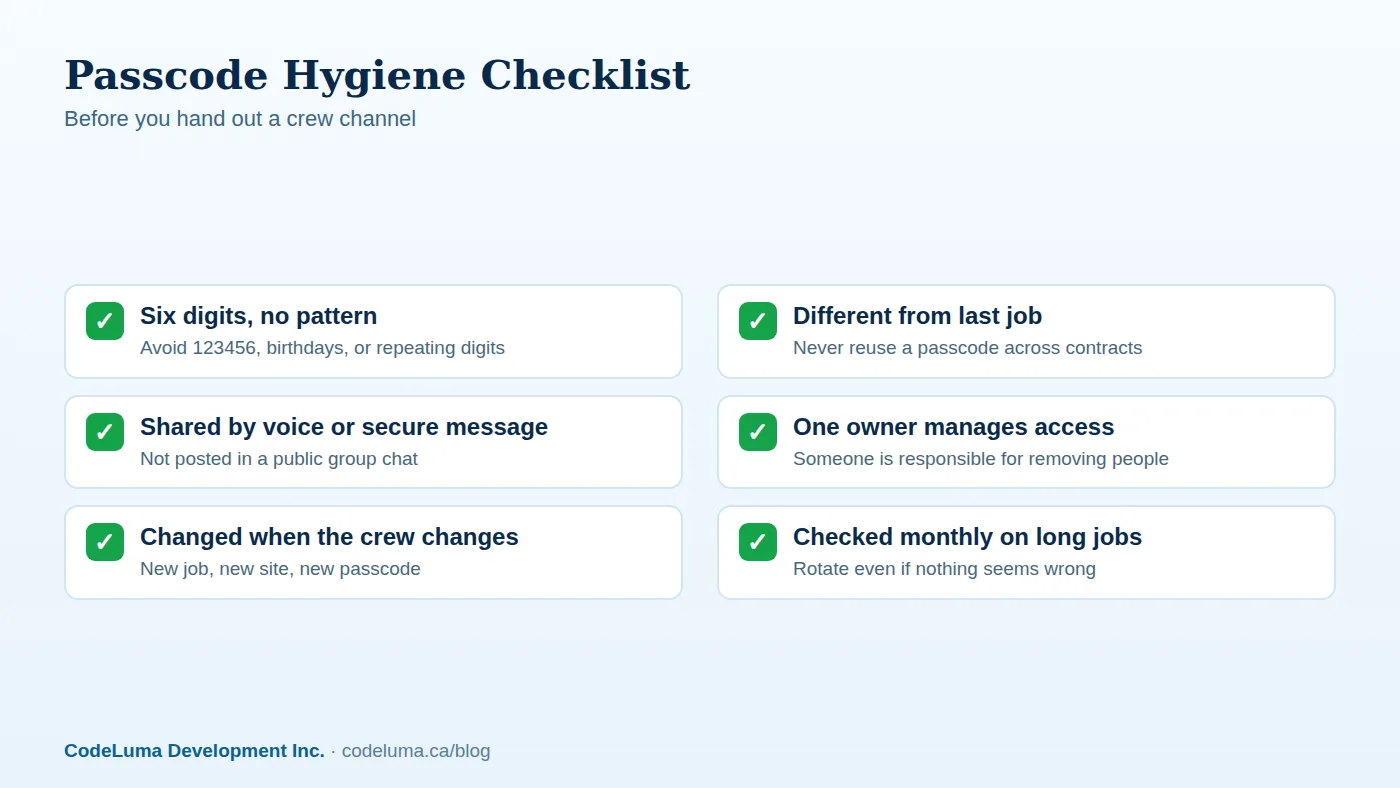
Good passcodes are boring on purpose. A few rules that hold up across most crews:
- Skip sequences like 123456 or 654321.
- Skip repeated digits like 222222 or 101010.
- Skip dates tied to the job, the company, or a crew member's birthday.
- Mix the digits with no obvious pattern, the same way you'd avoid an obvious door code.
- Don't reuse a passcode you've used on a previous job or a different room.
None of this takes more than a few seconds, but it's the difference between a passcode that actually filters people out and one that's really just for show.
Who Should Get the Code and the Passcode
Keep the list short and intentional. The channel code and passcode should go to the people who need to talk on that specific job: the crew working it, a supervisor checking in, maybe a dispatcher coordinating multiple rooms. They shouldn't go to a general company group chat, a shared drive everyone can see, or a sign-in sheet at a front desk. If you wouldn't hand someone a physical key to the site, don't hand them the passcode either.
How to Share a Passcode Without Leaking It
The safest way to pass along a channel code and passcode is to say it out loud or send it through a private, direct message to each person who needs it. Avoid pasting it into a large group thread, a public bulletin, or anywhere it could sit around and get forwarded long after the job is done. For teams setting up their very first room, a quick setup walkthrough covers the basics of getting a private room running before you worry about who gets the keys.
Rotate Passcodes Between Jobs, Not Just Once a Year
A passcode that never changes slowly turns into public knowledge. People move between crews, contracts end, phones get lost or replaced. The fix is simple: treat each new job or contract as a reason to set a new passcode, not to recycle the old one. On long-running jobs, rotate it periodically even if nothing seems wrong, the same way you'd change a combination lock after enough people have cycled through.

Removing People When a Job Ends
Changing the passcode is one layer of control, but room owners can also remove individual people directly. When someone finishes a contract, leaves the crew, or simply no longer needs to be in that room, remove them rather than waiting for the next passcode change to quietly lock them out. This matters most for larger operations, since some supported private plans allow rooms with up to 100 participants, and a room that size needs active management, not a "set it and forget it" passcode from months ago.
Common Mistakes Crews Make
- Using the same passcode across every job because it's easy to remember.
- Writing the passcode on a whiteboard or paper sign visible to anyone walking by.
- Sharing the passcode in a company-wide channel instead of directly with the crew.
- Forgetting to remove subcontractors or temporary staff once their work is done.
- Assuming encryption in transit means the room itself is automatically private, when the passcode is doing that job.
Most of these come from convenience winning out over a ten-second habit. The fix isn't complicated, it just needs to become routine, especially for business teams running multiple crews or security staff coordinating shifts where the wrong listener matters more than usual.
A Quick Setup Checklist
- Set a six-digit passcode with no obvious pattern.
- Share the channel code and passcode only with people who need the room.
- Send it privately, never in a public or broad group thread.
- Assign one person as the room owner responsible for managing access.
- Remove people as soon as they leave the job.
- Set a new passcode for the next contract instead of reusing the old one.
If you want a deeper look at what makes a passcode hard to guess in the first place, this guide to picking a passcode strangers can't guess walks through the reasoning in more detail.
Wrap-Up: Treat the Passcode Like a Key
No online communication system can promise absolute security, and Walkie Talkie HRL doesn't claim to. What it does offer is voice encrypted in transit plus a private room system with real access controls: a channel code, a six-digit passcode, and an owner who can remove people when needed. The technology does its part automatically. The passcode habits are on you, and they're simple enough that there's no good excuse to skip them. Pick a passcode that isn't obvious, share it carefully, rotate it between jobs, and your crew's channel stays exactly what it's meant to be: a room for the people who are supposed to be in it. For a refresher on getting a room running the right way, see the FAQ or start from how it works.
Try Walkie Talkie HRL
Set up a private channel with its own channel code and six-digit passcode in minutes, right on the phone already in your pocket. Check {{svc:howto|how it works}} to get the first transmission out, then lock the room down with {{svc:private|private channels}}.
- Private channels - access-controlled rooms with a channel code and six-digit passcode.
- Business teams - construction, logistics and event crews.
- How it works - install, allow audio, join a channel and hold to talk.
- Questions and answers - compatibility, accounts, rooms and audio.
Private, instant and already in your pocket. Walkie Talkie HRL turns the phone you already own into a push-to-talk walkie-talkie. Voice is encrypted in transit; no online service can promise absolute security. It is not an emergency-calling service.