In Transit vs. End-to-End: An Honest Comparison
"Encrypted" gets used as a single word that supposedly means "safe," but it actually covers a family of different techniques that protect different things. Two terms in particular get treated as interchangeable when they shouldn't be: encrypted in transit and end-to-end encryption. If you're choosing a communication tool for a team, a family, or a security detail, it's worth understanding the difference before you decide it doesn't matter.
What "Encrypted in Transit" Actually Means
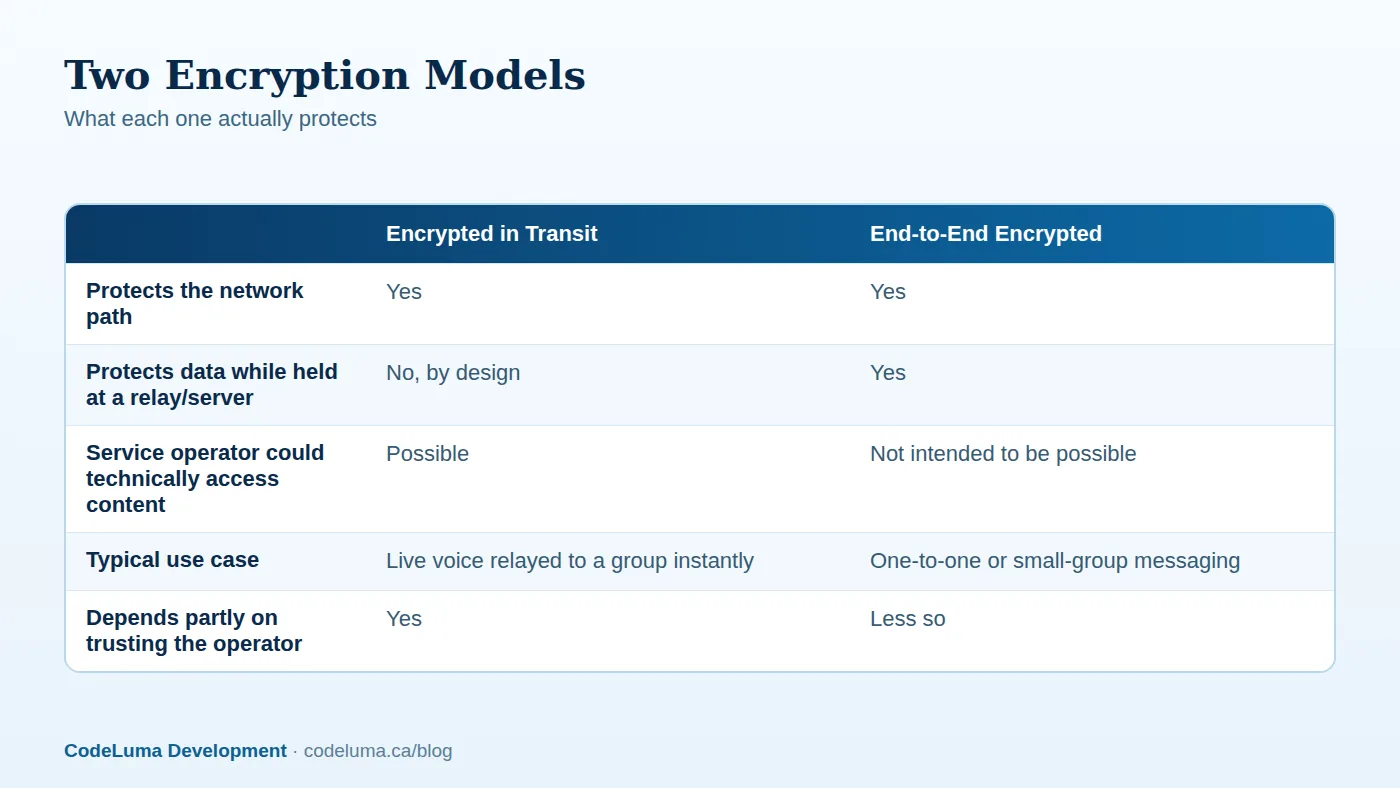
Encryption in transit protects data while it moves across the network — from your phone, through the internet, to wherever it's headed next. Think of it as a sealed, locked pipe. Someone intercepting the traffic between your device and the relay that carries your voice can't casually read or listen to what's inside. That matters a lot, because the open internet and public Wi-Fi networks are exactly the kind of place where unprotected traffic could otherwise be picked off.
What transit encryption does not do is protect data once it arrives at the server or relay that's doing the work of connecting people. At that point, the service operator's systems are handling the audio to route it to the right room and the right listeners. That's simply how a live, instant, many-listener push-to-talk system has to work.

What "End-to-End Encryption" Actually Means
End-to-end encryption goes a step further. In an end-to-end model, only the sender and the intended recipient hold the keys needed to unlock the content — not even the company running the servers in between can read it. It's a stronger guarantee for content privacy, but it comes with real tradeoffs: it's typically built for messaging or one-to-one and small-group calls, and it changes how features like instant group broadcast, server-side moderation, or easy recovery can work.
Neither model is "the encrypted one" and the other "the unencrypted one." Both use encryption. They just draw the protected boundary in a different place.
The Real Difference: Who Can See What, and When
Here's the plain version: with transit encryption, your voice is locked up for the trip across the network, but it becomes readable at the relay for the moment it takes to route it to listeners. With end-to-end encryption, the content stays locked even at the relay — only the endpoints can unlock it.
Neither claim should be inflated. No online communication system, of either kind, can honestly promise perfect or absolute security. Encryption reduces specific risks; it doesn't erase every risk. Anyone who tells you a system is unbreakable or impossible to compromise isn't being straight with you.
Why Walkie Talkie HRL Uses Transit Encryption
Walkie Talkie HRL encrypts your voice in transit. That's a deliberate fit for what the service actually does: instant, hold-to-talk group broadcast where one voice reaches a whole room of listeners the moment you release the button. That kind of real-time group relay is what push-to-talk has always been about, going back to radio — and it's the model that lets a private room work smoothly for a crew of six, a family on a road trip, or a security team covering a venue.
If you want the fuller technical picture of what "encrypted in transit" covers for this specific app, we've written about it in more detail here.
What Private Rooms Add on Top
Transit encryption protects the network path. Private rooms add a second, separate layer: access control. Each private room has a unique channel code plus a six-digit passcode, so only people who have both can join. Some supported private plans allow up to 100 participants, which makes the model workable for anything from a small family group to a larger event team.
Room owners can remove people at any time — useful when a contractor's job wraps up, a seasonal volunteer moves on, or a family member simply doesn't need the room anymore. That combination of a locked network path plus a locked door into the room is what makes a private channel meaningfully different from an open, public one.
Good Habits That Make Transit Encryption Work Well
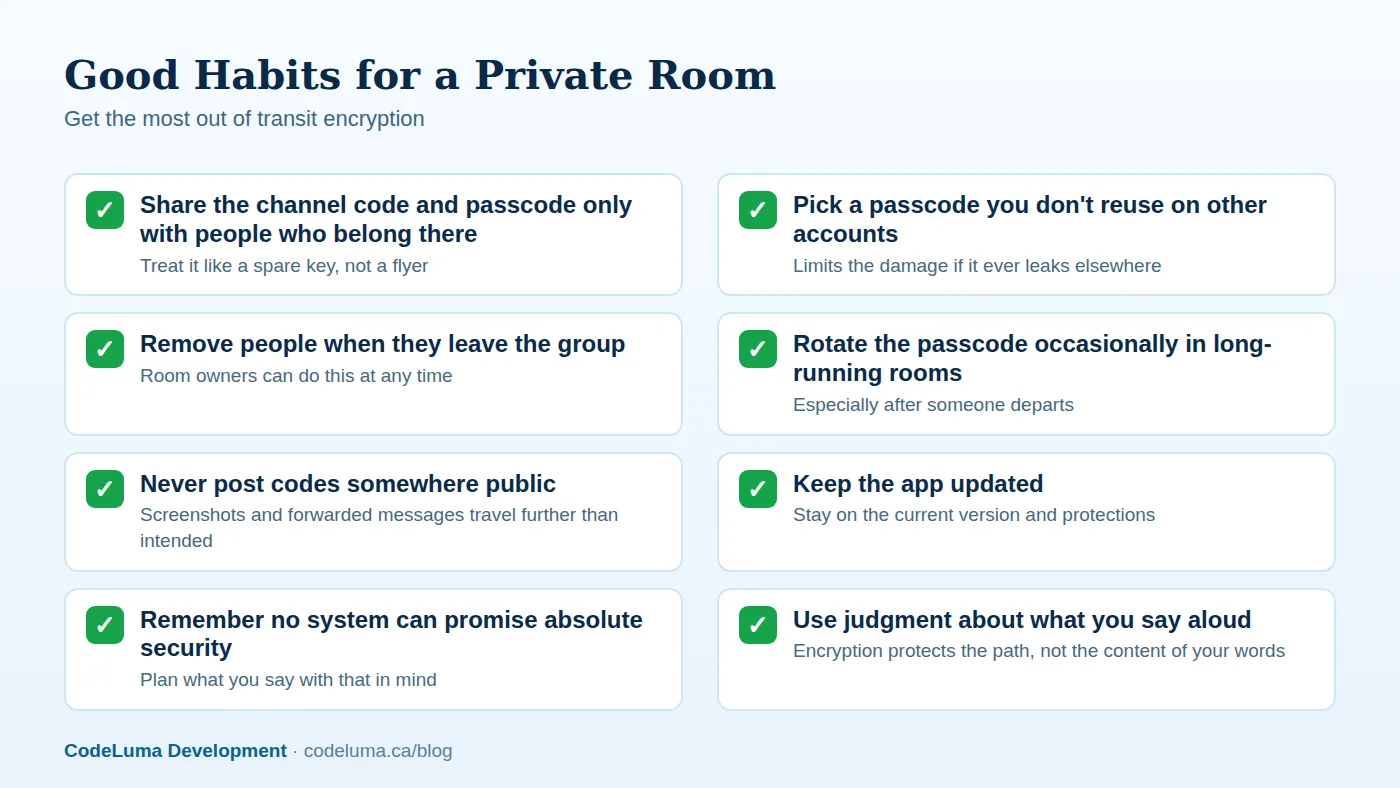
Encryption is only half the equation. How you manage access to a room does the rest of the work.
Common Mistakes People Make
A few habits quietly undercut the protection a private room is designed to give you:
- Reusing the same passcode everywhere. If it leaks from one context, it's exposed in all of them.
- Sharing codes in public or semi-public places. A code dropped into a large group chat or a public post stops being private.
- Forgetting to remove people who no longer need access. Old crew members, past guests, and former staff should be cleared out.
- Assuming encryption covers everything. It protects the transmission path — it says nothing about who you choose to let into the room, or what you choose to say once you're in it.

When You Might Want Something Different
Be honest with yourself about what you're using a tool for. If you need one-to-one messaging where you want the strongest possible guarantee that not even the service provider can read the content, an end-to-end encrypted messaging app is built for that specific job. If what you actually need is instant, live, one-to-many voice — a supervisor talking to a whole crew, a family keeping track of each other at a crowded event, security staff coordinating across a venue — that's the job push-to-talk with access-controlled rooms is built for. Different tools, different jobs, and it's fine to use more than one.
How to Set Up a Private Room in Practice
- Install the app on the device you already carry, whether that's an Android phone, an iPhone, or a Big Screen device.
- Create a permanent account with your email, a unique username, and a six-digit PIN.
- Set up or join a private room using its channel code and passcode.
- Share the code and passcode only with the people who should be in the room.
- Hold the button to talk, release to listen — and check in on who's still in the room every so often.
Full setup details, including permissions and audio settings, are covered in how it works.
A Quick Checklist Before You Talk
- Is this room private, with a channel code and passcode, rather than open to anyone?
- Does everyone currently in the room still need to be there?
- Is the passcode unique to this room, not reused elsewhere?
- Do you know how to remove someone if you need to?
- Are you keeping expectations realistic — useful protection, not an unbreakable guarantee?
The Honest Bottom Line
Encrypted in transit and end-to-end encryption both use real cryptography, and both reduce real risks — they just protect different parts of the journey. For instant, group, hold-to-talk conversation, transit encryption paired with an access-controlled private room is a sensible, honest fit. It won't promise the impossible, and it doesn't need to: locking the network path and locking the door to the room together give you a private way to talk on the phone you already carry. If you have questions about how any of this works, the FAQ is a good next stop.
Try Walkie Talkie HRL
Curious how your voice actually travels once you hold the button? Install Walkie Talkie HRL on the phone already in your pocket and set up a {{svc:private|private channel}} in a couple of minutes to see it in action. No radios, no extra hardware, just your existing device.
- Private channels - access-controlled rooms with a channel code and six-digit passcode.
- How it works - install, allow audio, join a channel and hold to talk.
- Questions and answers - compatibility, accounts, rooms and audio.
- Security teams - patrol, venue and hospital communication.
Private, instant and already in your pocket. Walkie Talkie HRL turns the phone you already own into a push-to-talk walkie-talkie. Voice is encrypted in transit; no online service can promise absolute security. It is not an emergency-calling service.