Private Rooms With Channel Codes: Keep Job Talk Job-Only
A job site runs on chatter - who's where, what's delayed, what needs a hand. That chatter is useful to your crew and nobody else. A private room with a channel code and a six-digit passcode is how you keep it that way: a space that only the people you choose can enter, built on phones your crew already carries.
What a Channel Code and Passcode Actually Do
A private room in Walkie Talkie HRL is identified by a unique channel code, and entry also requires a six-digit passcode you set. Think of the code as the room's address and the passcode as its lock. Someone would need both to get in - they can't stumble into your crew's room by guessing, and they can't join just because they're nearby or on the same network. This is the core idea behind private channels: access is controlled by what you share, not by who happens to be listening.
Why This Matters for Job Talk
Crews talk about schedules, access points, client details, and sometimes problems you'd rather not broadcast. On an open channel, anyone with the right code could be listening. In a private room, the circle is exactly the people you invited. That's a meaningful difference for a construction crew coordinating deliveries, a logistics team tracking a route, or any business team that needs a channel for work talk only. If you want the fuller case for keeping crew chatter off public channels, we've written about that here.
Building a Room Your Crew Actually Uses
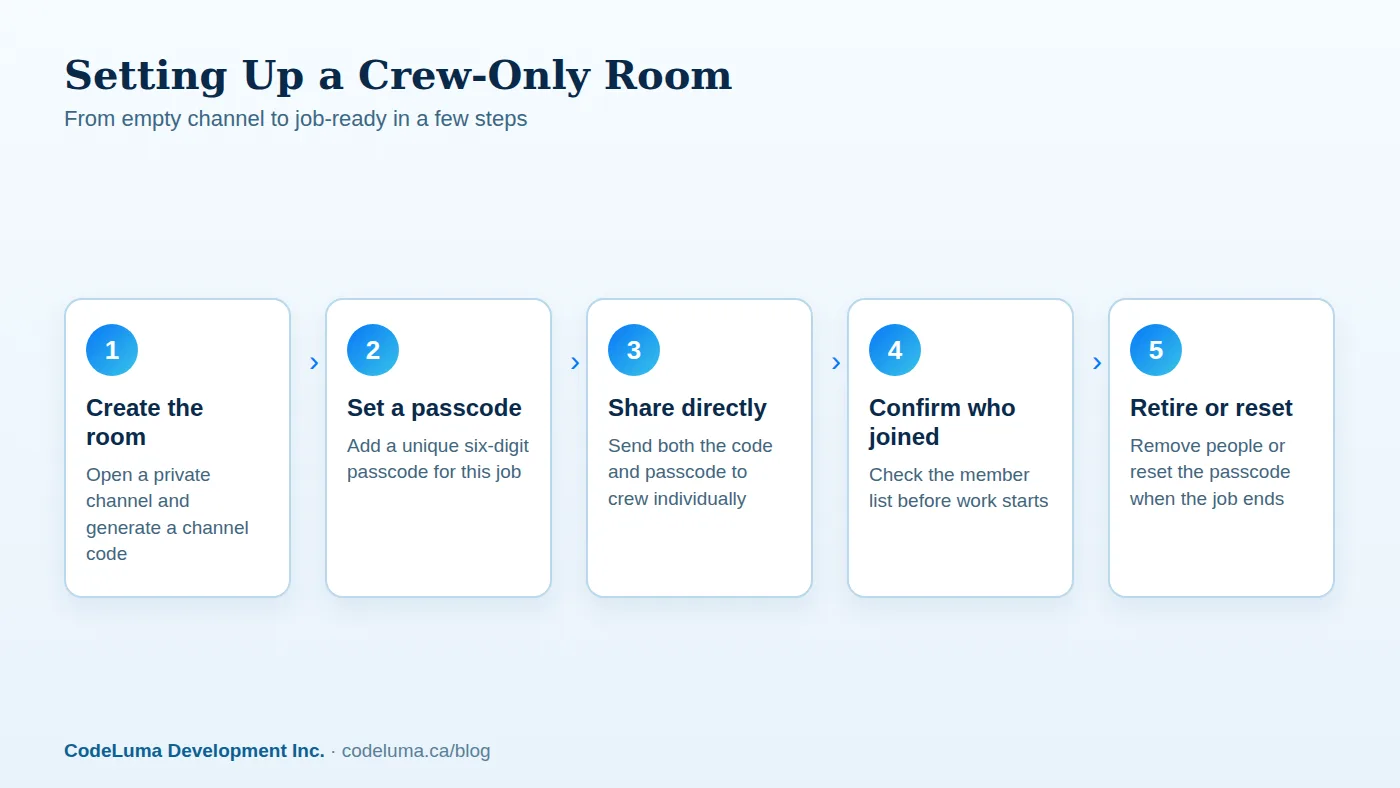
Setup takes a few minutes. Create the private room, which generates a channel code, then set a six-digit passcode for that specific crew or job. Share both pieces with the people who need them - directly, not in a group chat or posted somewhere public. Everyone installs the app on the phone they already own: Android or iPhone, and joins using the code and passcode. From there it's hold-to-talk, release-to-listen, the same as any walkie-talkie, just running over the internet connection their phone already has.
Who Should Get the Codes - and Who Shouldn't
Share the channel code and passcode only with people actually working this job: your crew, a supervisor who needs visibility, maybe a dispatcher. Don't post the pair in a general company chat, a shared document everyone can see, or a sticky note at the job trailer. If a code and passcode can be read by anyone walking past, it isn't really private anymore. A short list of who has it also makes it easier to notice if someone shouldn't.
Removing People When the Job Ends
Crews change. Subcontractors finish their piece and move on. Someone transfers to a different site. The room owner can remove people from a private room, and that's worth doing as a habit, not an afterthought. A room that's accumulated access from six jobs ago isn't private - it's just a list of everyone who's ever worked with you. Clean it out as crews rotate.
Don't Reuse the Same Passcode
It's tempting to pick one passcode and keep using it because it's easy to remember. That's also how a passcode quietly ends up known by far more people than you intended. Treat each job, crew, or season as a reason to set a new six-digit passcode. It costs nothing but a minute of setup, and it means a code shared for one job can't be used to wander into the next one.
Common Mistakes That Open a Room Up
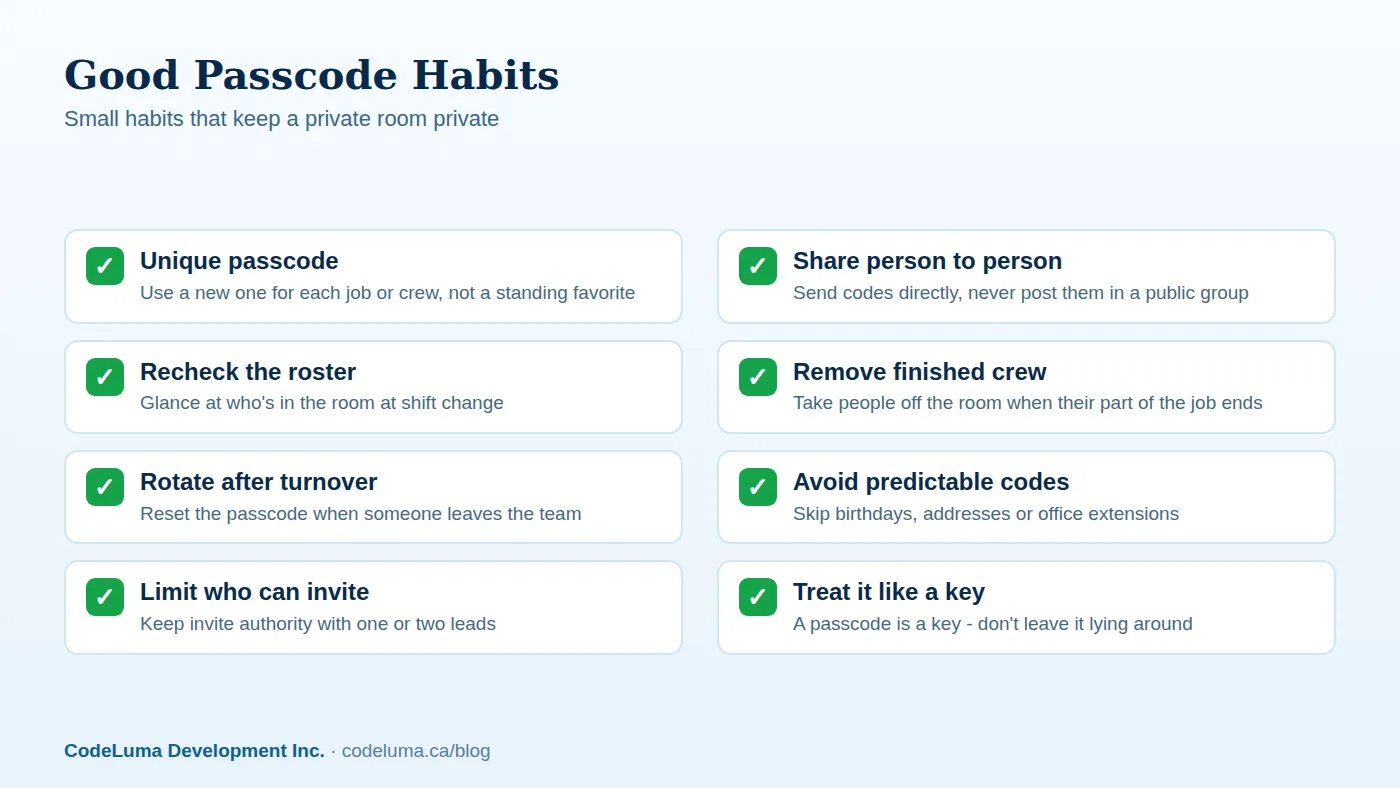
Most privacy problems with a channel aren't technical - they're habits. The usual culprits:
- Posting the passcode somewhere public - a group text with people outside the crew, a shared drive, a printed sign.
- Never removing former crew - access outlives the job it was created for.
- Reusing one passcode everywhere - one leak affects every room that used it.
- Picking an obvious passcode - a birthday, an address, a number everyone already knows.
- Letting anyone invite anyone - without a clear owner, the room's membership drifts.
None of these require special tools to fix. They just require someone on the crew to own the room and treat the passcode like a real key.
What "Encrypted in Transit" Adds on Top
Separate from who's allowed in the room, there's the question of how voice travels once you're talking. Voice in Walkie Talkie HRL is encrypted in transit, meaning it's protected as it moves across the internet between your phone and the room. That's a real layer of protection, but it's worth being precise about what it is and isn't: it is not end-to-end encryption, and no online communication service - this one included - can promise absolute security. The channel code and passcode control who gets into the room; encryption in transit protects the voice while it's moving. Together they're a sensible, honest combination for job talk, not a guarantee. If you want the longer explanation of what "in transit" means and where its limits are, this earlier piece covers it.
Beyond the Job Site
The same channel-code-plus-passcode setup works anywhere a group needs a closed room: a security team coordinating a patrol or event, a family wanting one room that's just theirs, or a crew that moves between sites and wants a channel that follows them rather than a radio that stays behind. The pattern is always the same - a code that identifies the room, a passcode that locks it, and an owner who manages who's inside.
Checklist Before Your Next Job
- Room created with a fresh channel code for this job
- New six-digit passcode set, not reused from last time
- Code and passcode shared directly with crew only
- Member list checked at shift start
- Plan in place to remove people as the job wraps
Running through this list takes a few minutes and saves you from the slow drift where a room meant for one crew quietly becomes a room everyone's been in at some point.
Wrap-Up
A private room isn't private because of a setting you toggle once - it's private because of the code and passcode you control, who you hand them to, and how often you clean house. Get that right and your crew has a channel that's theirs: instant, held in the hand they already carry, and closed to everyone who isn't supposed to be listening. Check how it works for the full setup walkthrough, or see the FAQ for common questions about rooms and accounts.
Try Walkie Talkie HRL
Your crew already carries the only hardware this needs - their phones. {{svc:app_android|Download Walkie Talkie HRL for Android}} or {{svc:app_iphone|add it to your iPhone Home Screen}}, then set up a {{svc:private|private channel}} with a channel code and passcode so only your people are in the room.
- Private channels - access-controlled rooms with a channel code and six-digit passcode.
- Business teams - construction, logistics and event crews.
- How it works - install, allow audio, join a channel and hold to talk.
- Questions and answers - compatibility, accounts, rooms and audio.
Private, instant and already in your pocket. Walkie Talkie HRL turns the phone you already own into a push-to-talk walkie-talkie. Voice is encrypted in transit; no online service can promise absolute security. It is not an emergency-calling service.