Why Anyone With a Scanner Can Hear Your Two-Way Radio
If you've ever owned a police scanner, or known someone who has one as a hobby, you already understand something that a lot of two-way radio users forget: most radio channels are not private. Traditional walkie-talkies and business-band radios typically transmit in the clear, which means the audio itself isn't scrambled or restricted to a particular audience. Anyone with a receiver tuned to the right frequency can listen in, often without the speaker ever knowing. For teams, families, and security staff who assume their channel is "theirs," that can be an uncomfortable surprise.
How a Scanner Actually Hears Your Channel
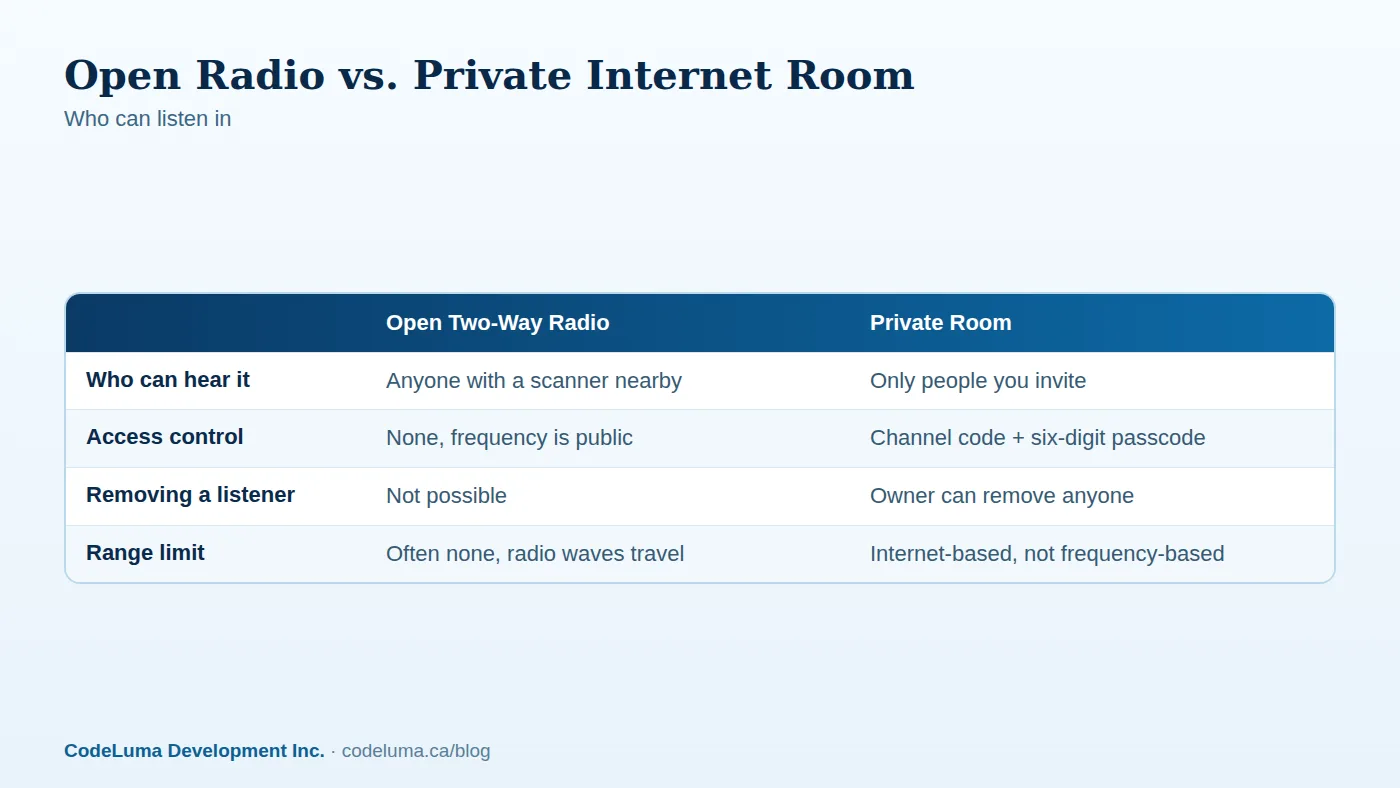
A scanner is simply a radio receiver that can scan across a range of frequencies and lock onto active signals. Traditional two-way radios transmit on specific frequencies, and many commonly used radio services broadcast in the clear by default. A scanner tuned to that frequency range doesn't need a password, a login, or an invitation. It just needs to be within range and listening at the right time. This is exactly how radio hobbyists, and plenty of curious neighbors, have listened to construction sites, retail security, event staff, and even families on road trips for decades.
Why This Surprises So Many Users
Most people who use two-way radios never think about who else might be listening. The radio works, the person on the other end hears you, and that feels private enough in the moment. But "it worked" and "it was private" are two different things. Unless a radio system specifically mentions encryption or restricted access, the safest assumption is that the channel is open to anyone with the right equipment, which today is inexpensive and easy to obtain.
What Gets Overheard in Practice
Imagine a retail security team on an open channel describing a specific aisle, a specific employee's break schedule, or where cash gets moved at closing. Imagine a family on a road trip announcing which campsite they're heading to next, or a work crew discussing when a site will be unsupervised. None of this is sensitive in isolation, but patterns add up, and an open channel hands those patterns to anyone who happens to be scanning.
Encryption in Transit: A Different Starting Point
Walkie Talkie HRL takes a different approach because it doesn't use radio frequencies at all. Voice is carried over the internet and is encrypted in transit, meaning it's protected as it travels between the app and the service. That's a meaningfully different starting point than an open radio frequency, where the audio is simply broadcast for any receiver to catch. No system, including this one, can promise absolute security, but encrypting voice in transit removes the specific, well-known weakness that makes scanner eavesdropping possible on open radio in the first place. For a deeper look at what "in transit" actually covers, see our plain-language explainer on encryption in transit.
Private Rooms: Who Gets In and Who Doesn't
Beyond encryption in transit, private channels add a second layer: access control. Instead of anyone tuning in, a room is protected by a unique channel code plus a six-digit passcode. Only people who have both can join, and some supported private plans allow up to 100 participants, which is plenty for most teams, families, or event crews. If someone leaves the team or shouldn't be in the room anymore, the owner can remove them directly. There's no equivalent of "removing" a listener from an open radio frequency; once someone has a scanner and the frequency, they can keep listening indefinitely.
Good Habits for Sharing a Passcode
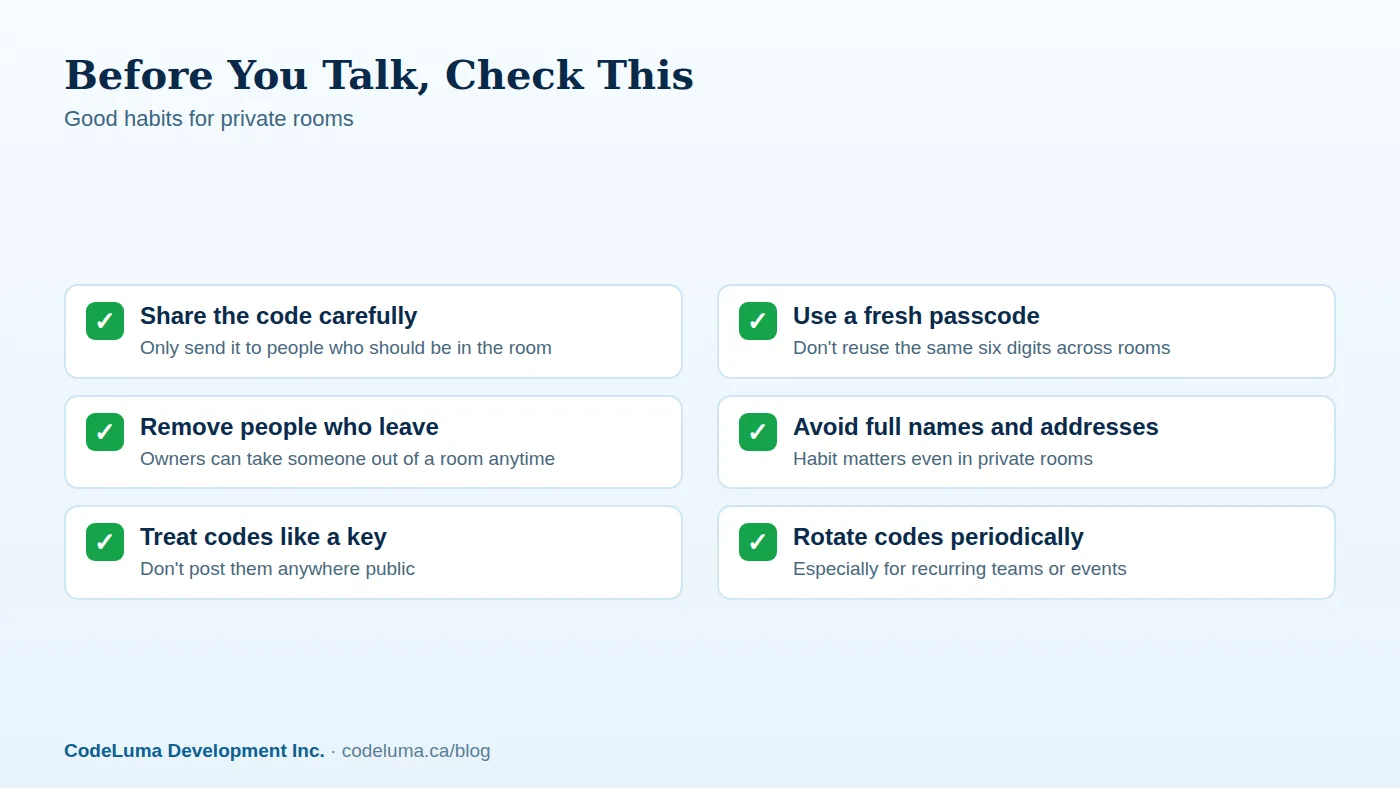
- Share the channel code and passcode only with people who need to be in the room, the same way you'd share a house key.
- Use a different passcode for each room or event rather than reusing one everywhere.
- Remove people from the room as soon as they no longer need access, rather than leaving the room open indefinitely.
- Avoid posting codes in public group chats, printed flyers, or anywhere someone outside the intended group might see them.
No License, No Frequency, No Extra Gear
Because Walkie Talkie HRL carries voice over the internet rather than radio frequencies, there's no amateur radio license required to use it. It works over Wi-Fi or mobile data almost anywhere there's an internet connection, including satellite-backed Wi-Fi in some locations. That also means there's no separate radio hardware to buy, charge, or carry. Everyone on the team, in the family, or on security staff already has a smartphone in their pocket, and that's the only device needed. See how it works for the basics on getting a channel running.
Setting Up a Private Room the Right Way
- Install the app: Android via APK, or add the web app to your iPhone Home Screen.
- Create a permanent account with an email address, a unique username, and a six-digit PIN.
- Create a private room and generate a channel code plus a six-digit passcode.
- Share the code and passcode directly with the people who need to join, not in a public post.
- Hold the button to talk, release to listen, and remove anyone from the room who no longer needs access.
Common Mistakes That Undo Privacy
- Reusing the same passcode across every event or team. If one group's code gets shared loosely, every other room using that code is exposed too.
- Posting a code somewhere public "for convenience," like a shared community board or a public social post.
- Forgetting to remove former members after someone leaves a team, a job, or a family trip.
- Assuming any walkie-talkie app is automatically private without checking whether it uses access-controlled rooms at all.
Security Staff and Teams: Why This Matters More
For security teams and business crews, open radio chatter can describe patrol timing, blind spots, or operational details that are exactly the kind of information you don't want broadcast to a stranger with a scanner. A private room with controlled access and encryption in transit doesn't just sound more professional, it closes a specific, well-documented gap that open radio frequencies have always had. Related reading: Why Your Crew's Radio Chatter Shouldn't Be Public.
Families and Everyday Use
The same logic applies at home. A family coordinating at a theme park, a campsite, or during travel doesn't need strangers picking up details about where they are or where they're headed next. A private room with a passcode keeps that conversation contained to the people who are supposed to hear it.
The Bottom Line
Open two-way radio has a long-standing, well-understood weakness: the audio goes out to anyone listening on that frequency, scanner included. Encryption in transit plus an access-controlled private room addresses that weakness directly, without requiring anyone to buy, charge, or carry new hardware. No system can promise perfect security, but choosing a private room over an open channel is a clear, practical upgrade for anyone who'd rather their conversation stay among the people who were actually invited to it. Check the FAQ for setup details, or browse the blog for more on how private channels work.
Try Walkie Talkie HRL
Ready to stop broadcasting your conversations to anyone nearby with a receiver? Download Walkie Talkie HRL on the Android or iPhone you already carry and set up a private channel with a passcode in minutes. See {{svc:howto|how it works}} to get your crew talking in under five minutes.
- Private channels - access-controlled rooms with a channel code and six-digit passcode.
- How it works - install, allow audio, join a channel and hold to talk.
- Download the Android app - install Walkie Talkie HRL on your Android phone or tablet.
- Install on iPhone - add the web app to your iPhone Home Screen.
Private, instant and already in your pocket. Walkie Talkie HRL turns the phone you already own into a push-to-talk walkie-talkie. Voice is encrypted in transit; no online service can promise absolute security. It is not an emergency-calling service.