Why Open Radio Channels Leak Site Details to a Scanner
Anyone can walk into an electronics store, buy a handheld scanner, and start listening to local radio traffic the same evening. If your team talks on an open, unencrypted channel, that scanner hears exactly what you say: which gate you're covering, what time the cash pickup happens, which guest room had a problem, or when the building goes quiet for the night. None of that requires hacking anything. It just requires being within range and turning a dial.
How a Scanner Picks Up Your Channel
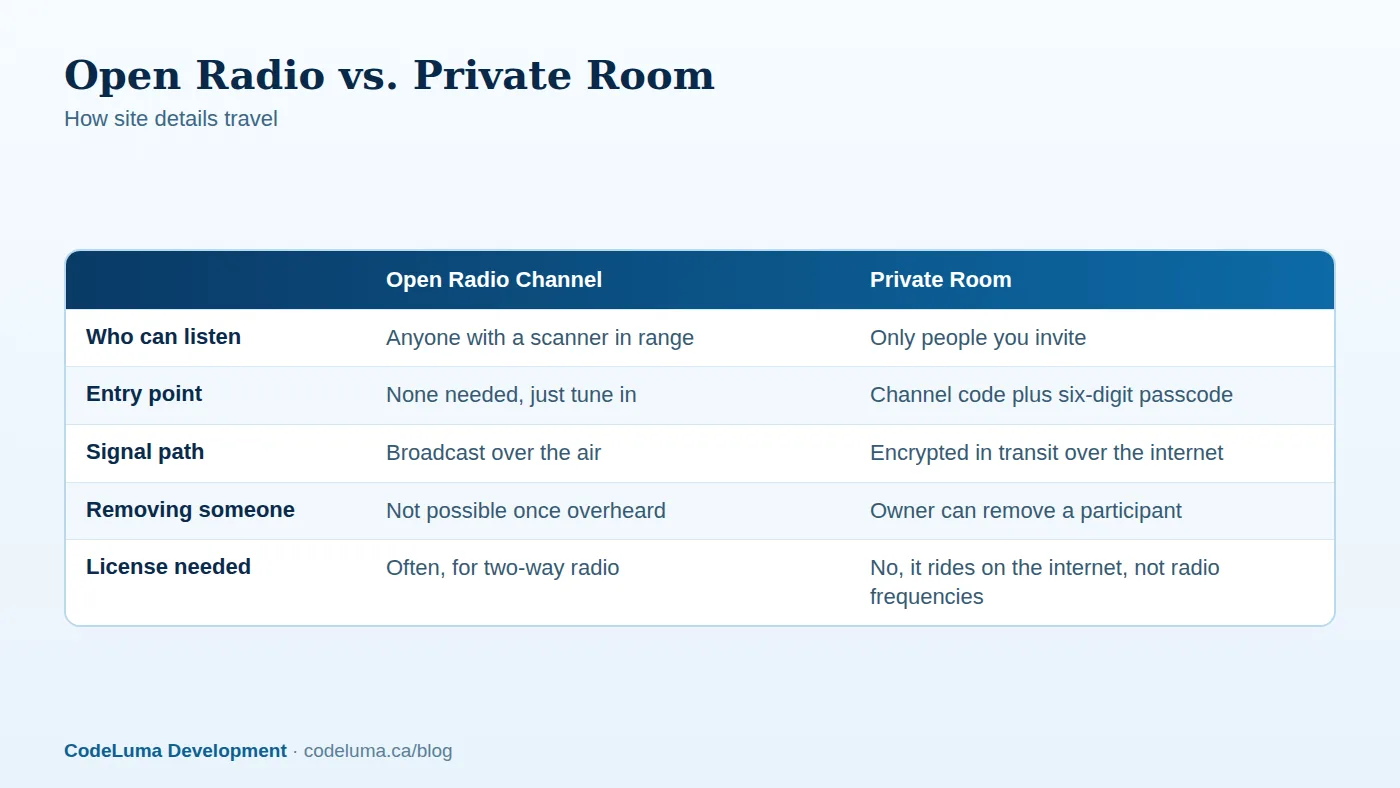
Traditional two-way radios, including most consumer and business handhelds, transmit on open radio frequencies. Unless a system is specifically built with encryption, that signal is plain audio riding on a radio wave, and any receiver tuned to the same frequency can pull it in. Scanners that cover common business and public safety bands are inexpensive and legal to own in most places. Overhearing an unencrypted channel isn't a sophisticated attack; it's the normal, intended behavior of the technology.
What "Open Channel" Actually Means
An open channel is any frequency without encryption or access control layered on top. It doesn't matter whether your team thinks of it as private just because you picked an unused frequency or a specific code tone. If the audio itself isn't protected, it's public to anyone with the right receiver. The address of the channel, so to speak, is discoverable, and the content riding on it is not protected at all.
The Site Details You're Giving Away
Think about a typical shift on an open channel. Over a few hours, a scanner listener could piece together the building's layout, patrol timing, which doors get checked and when, staff names and shift changes, where deliveries are received, and what happens when something unusual comes up. None of that feels sensitive in the moment because it's just routine chatter. Strung together over a shift or a week, it's a fairly complete picture of how a site operates and when it's least protected.
Why This Matters More for Security and Patrol Teams
For guards, venue staff, and patrol crews, radio traffic is often the single most honest record of how a site really runs, more accurate than any posted schedule. That's useful for your own team and genuinely useful to anyone who wants to know when a loading dock is unattended or when a patrol route has a gap. This is exactly the kind of exposure your crew's radio chatter shouldn't create, and it's worth treating as a real operational risk rather than a theoretical one.
How Encryption in Transit Changes the Picture
Walkie Talkie HRL doesn't use radio frequencies at all. Voice travels as encrypted data over the internet, whether that's Wi-Fi or mobile data, the same general kind of protection used for most everyday apps that carry sensitive information. Encrypted in transit means that as your voice moves from your phone to the relay and out to your team, it's protected against casual interception along the way. It does not mean unbreakable or impossible to compromise under any circumstance, and no online communication system can honestly promise absolute security. What it does mean is that a stranger with a radio scanner has nothing to tune into, because there's no radio broadcast happening in the first place. If you want the fuller technical picture, this is explained in plain language here.
Private Rooms: Channel Codes and Passcodes
Beyond the encrypted connection, private channels add a second layer: a unique channel code plus a six-digit passcode that someone needs to actually join the room. That's meaningfully different from a scanner-accessible frequency, where the only thing standing between a stranger and your conversation is whether they happen to be tuned to the right spot. With a private room, the owner controls who gets the code, and can remove someone from the room if they no longer need access. Some private plans support rooms with up to 100 participants, which covers a wide range of teams from a small patrol crew to a larger event staff.
Good Habits for Private Rooms
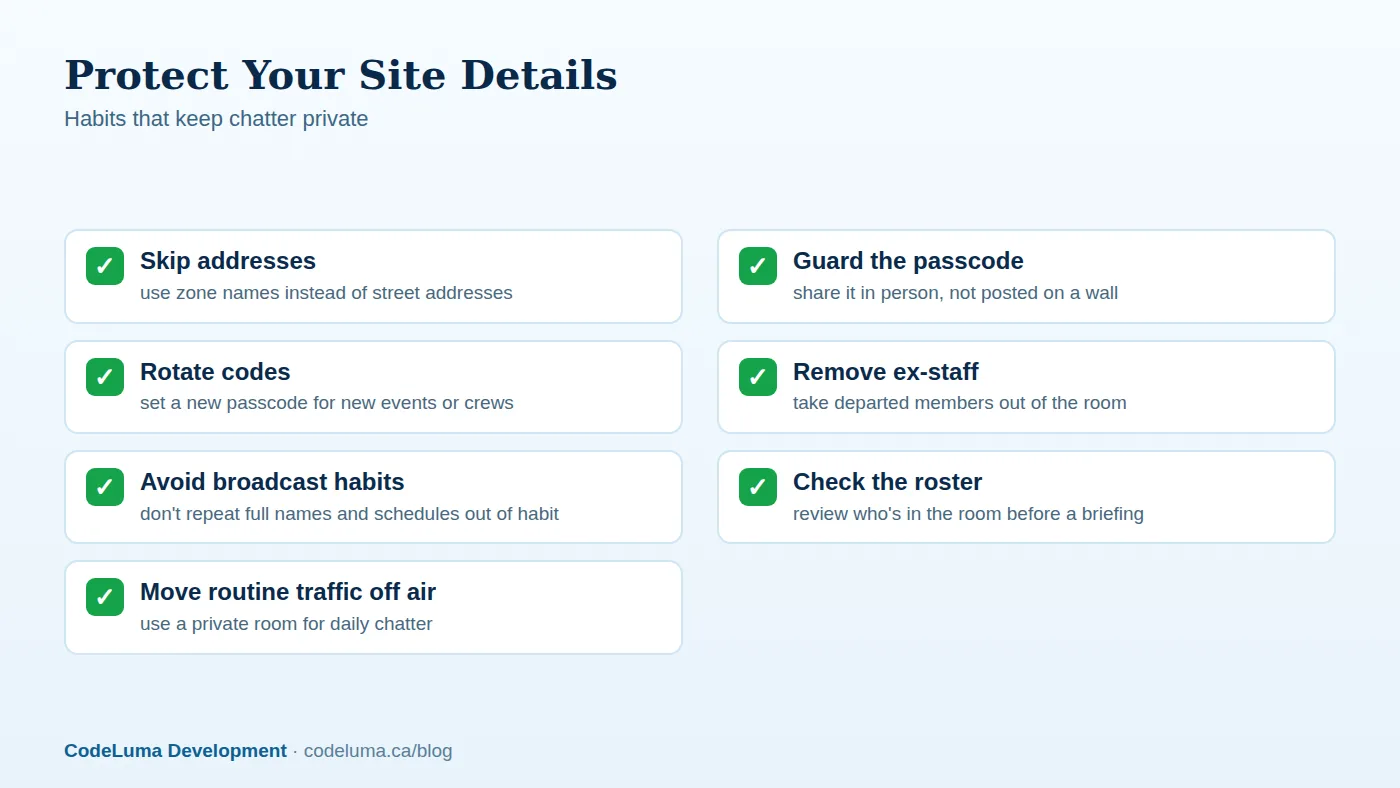
A private room is only as private as the habits around it. A few things make a real difference:
- Share codes deliberately. Hand out the channel code and passcode in person or through a private message, not on a shared whiteboard or a group chat that outlives the shift.
- Don't reuse passcodes. A fresh passcode for a new event, season, or crew rotation limits how far an old code can travel.
- Remove people promptly. When someone leaves the team or the contract ends, take them out of the room instead of assuming they'll just stop checking in.
- Review who's in the room occasionally, the same way you'd audit a key or badge list.
Common Mistakes That Undo Privacy
Most privacy problems, on radio or on an app, come down to habits rather than the technology itself. Teams get used to saying full addresses over the air out of convenience. Passcodes end up written on a wall or texted into a group chat that has more members than the actual working team. Former staff keep access long after they've left. A private room removes the scanner risk entirely, but it won't fix any of these habits on its own.
A Short Setup Checklist
Before you move a team off an open channel, run through this list:
Setting Up a Private Room in Minutes
Getting a team onto an encrypted, access-controlled room doesn't take special equipment. Everyone already has a phone, so there's nothing new to buy, charge, or carry. See how it works, create a room, set a passcode, and share both with your team directly. From there it's the same hold-to-talk, release-to-listen flow people already expect from a radio, just without a signal anyone outside the room can pick up. Questions about compatibility, accounts, or audio are covered in the FAQ.
Wrap-Up
An open radio channel isn't private just because nobody's complained about it yet. A scanner costs little, requires no special skill, and hears everything said on an unencrypted frequency, including the site details your team probably assumes stay inside the shift. Moving routine traffic into a security team room with a channel code, a passcode, and good habits around both closes that gap without adding equipment to the job.
Try Walkie Talkie HRL
If your team is still naming locations and schedules out loud on an open channel, it's worth trying something different tonight. Download Walkie Talkie HRL on the phone already in your pocket and set up a {{svc:private|private room}} with a channel code and passcode in a few minutes.
- Security teams - patrol, venue and hospital communication.
- Private channels - access-controlled rooms with a channel code and six-digit passcode.
- How it works - install, allow audio, join a channel and hold to talk.
- Questions and answers - compatibility, accounts, rooms and audio.
Private, instant and already in your pocket. Walkie Talkie HRL turns the phone you already own into a push-to-talk walkie-talkie. Voice is encrypted in transit; no online service can promise absolute security. It is not an emergency-calling service.