Why FRS and GMRS Chatter Is Easy to Overhear (And What Helps)
If you've ever used a pair of FRS or GMRS radios on a job site, a camping trip, or a family outing, you've probably assumed that your channel was just yours. It isn't. Those radios share a small set of public channels with everyone else who owns a similar radio within range, and that chatter is far easier to overhear than most people realize. This article explains how open radio channels actually work, who can listen in, and when a private internet room is a better fit for your group.
How FRS and GMRS Channels Actually Work
FRS (Family Radio Service) and GMRS (General Mobile Radio Service) radios transmit on a small number of fixed channels set aside by the FCC for public use. That's the whole point of the service: anyone can buy a pair of FRS radios off a store shelf and start talking on channel 1 through 22 without a license. GMRS adds a bit more power and range, and technically requires a license, but the channels themselves are still shared with every other GMRS and FRS user nearby.
Because the channel count is small and the radios are inexpensive, it's common for several unrelated groups in the same area, campers, event staff, retail crews, to end up on the same or adjacent channels without knowing it.
Who Can Actually Hear You on an Open Channel
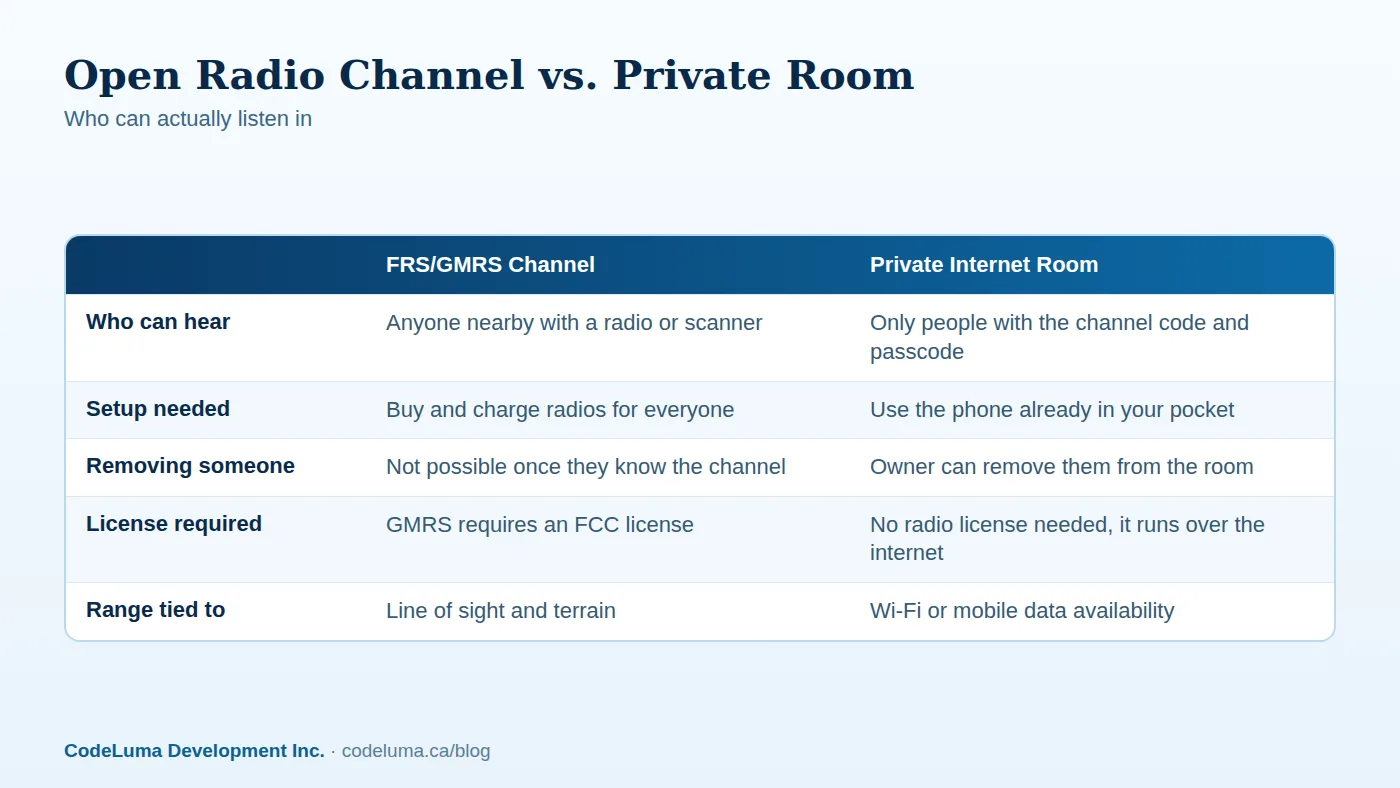
On a shared radio channel, anyone with a compatible radio tuned to the same channel can hear you, whether or not they're part of your group. A radio scanner, or even another cheap FRS radio set to the right channel, picks up your conversation just as clearly as your intended listener does. There's no account, no login, and no way to know who else is listening. We've written before about what a scanner can actually hear on these radios, and the short answer is: more than most people expect.
This matters more than it might seem. A security team describing a patrol route, a family sharing a meeting spot at a crowded event, or a work crew discussing site logistics are all broadcasting that information to any stranger with a radio nearby.
Why "Privacy Codes" Don't Mean Privacy
Many FRS and GMRS radios advertise "privacy codes" or sub-channels, often labeled with numbers like 1 through 38. These are genuinely useful for cutting down on crosstalk between groups using the same main channel, but they do not encrypt or restrict anything. A privacy code just filters out other chatter from your radio's speaker, it doesn't stop another radio from tuning to your exact combination and hearing everything. Anyone willing to cycle through the codes, or using a scanner that ignores them entirely, can still listen in. The name is misleading, and it's one of the most common reasons people assume their radio conversations are protected when they aren't.
What's at Stake for Teams, Families, and Security Staff
The stakes vary by who's talking. A family at a theme park sharing a child's location isn't trying to keep secrets, but they probably don't want strangers tracking their movements either. Security staff patrolling a venue or hospital may be discussing sensitive details, like which doors are unlocked or where an incident is unfolding, that shouldn't be public information. Event crews and job sites often talk about schedules, deliveries, or problems that competitors or opportunistic listeners have no business hearing.
None of this requires anyone to be a sophisticated eavesdropper. A cheap scanner or a second FRS radio is all it takes, and that's exactly why open radio channels are a poor fit for anything you'd consider private.
A Different Approach: Private Rooms Over the Internet
Walkie Talkie HRL takes a different approach by carrying voice over the internet instead of over open radio frequencies. Voice is encrypted in transit as it travels between phones, and groups can set up a private room protected by a unique channel code plus a six-digit passcode. Only people who have both pieces can join. It's worth being clear and honest here: encrypted in transit means your voice is protected on its way across the network, not that the system offers unbreakable or absolute security, no online communication service can honestly promise that. But it's a meaningfully different privacy model than a radio channel that anyone nearby can simply tune into.
Because it runs over Wi-Fi or mobile data, there's also no FCC license to apply for and no radio hardware to buy. You're using the phone already in your pocket.
What Changes When You Move to a Private Room
The biggest shift is who has access. On a radio channel, access is "anyone with a radio." In a private room, access is "anyone I specifically gave the code to." If someone leaves the team, a room owner can remove them, something that's simply not possible once a radio channel number is known. Some private plans support rooms with up to 100 participants, which comfortably covers large crews, event teams, or extended families without splitting people across multiple channels.
Setting Up a Private Room the Right Way
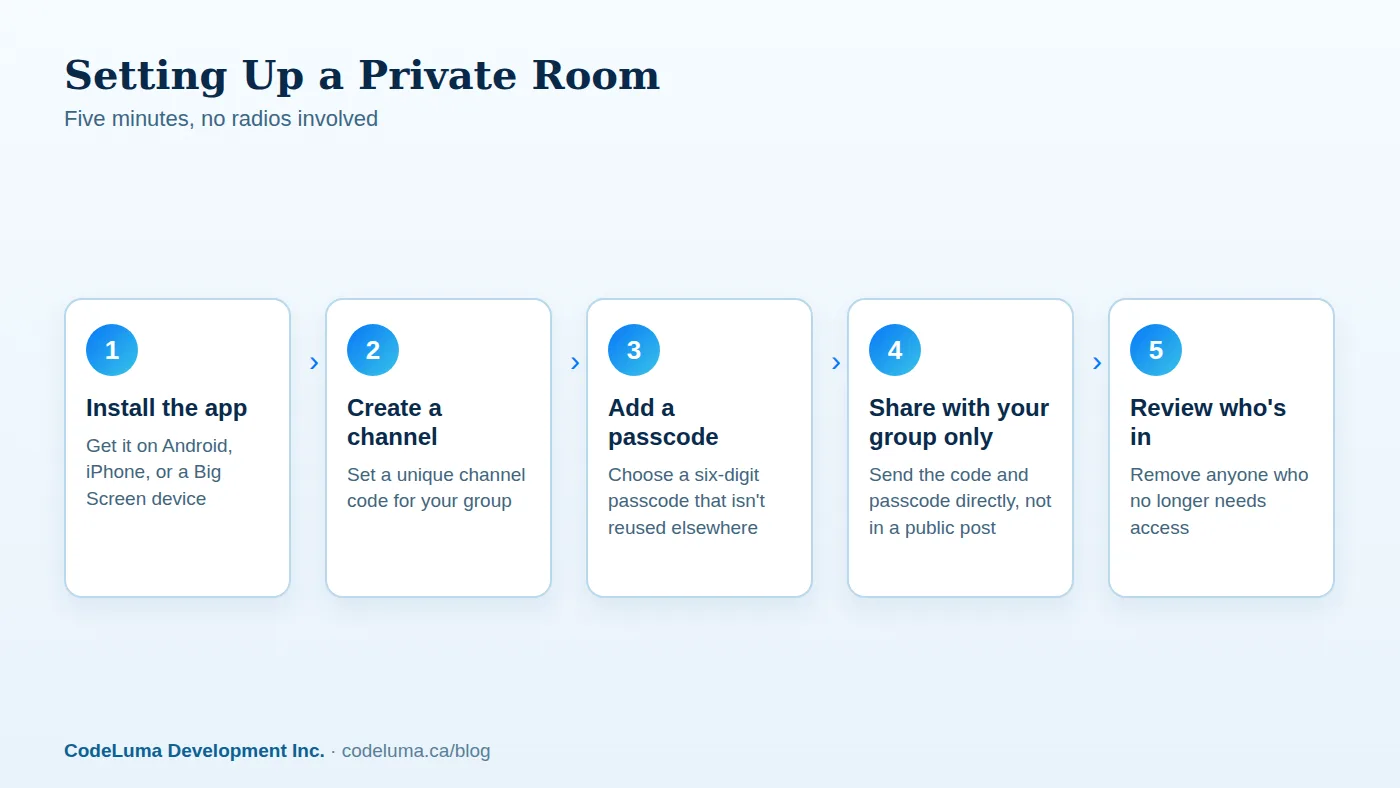
Getting started is straightforward. Our how it works page walks through the basics, but in short:
- Install the app on Android, iPhone, or a Big Screen device.
- Create a channel and set a six-digit passcode that isn't used anywhere else.
- Share the channel code and passcode directly with the people who need it, not in a group text that could be forwarded or a public post.
- Hold the button to talk, release to listen, just like a radio, except the room is yours.
Good Habits That Keep a Room Private
A private room is only as private as the habits around it. A few things worth doing from day one:
- Share the channel code and passcode only with people who actually need to be in the room, not a wider group chat.
- Pick a passcode that isn't reused from another account, as covered in how to pick a six-digit passcode strangers can't guess.
- Remove people from the room as soon as they leave the team, trip, or event.
- Create a fresh room for each new event or season instead of reusing an old one indefinitely.
Common Mistakes to Avoid
A few habits undo the privacy benefit even after switching to a private room: posting a channel code and passcode somewhere public, like a shared event flyer or an open forum; reusing the same passcode across multiple rooms or accounts; never reviewing who's still in the room months later; and assuming a radio's "privacy code" was actually private in the first place, which is the mistake that starts this whole conversation.
Is Your Current Setup Actually Private?
A quick gut check for any group currently relying on FRS or GMRS radios:
- Could a stranger with a scanner or a similar radio tune into our channel right now?
- Do we actually know everyone who might be listening nearby?
- If someone left our group today, could we stop them from hearing us tomorrow?
- Have we ever discussed something on this channel we wouldn't want a stranger to hear?
If any of those answers give you pause, it's a sign your group has outgrown an open channel.
The Bottom Line
FRS and GMRS radios are simple and reliable for short-range chatter, but they were never designed to be private, and the "privacy codes" on the box don't change that. For teams, families, and security staff who want to know exactly who can hear them, a private room over the internet, protected by a channel code and six-digit passcode, with voice encrypted in transit, is a more honest fit. Related reading: why your crew's radio chatter shouldn't be public.
Try Walkie Talkie HRL
If your group has been assuming its radio channel was private, it's worth five minutes to set up a real private room instead. Download Walkie Talkie HRL on the phone you already carry, create a channel code and six-digit passcode, and share it only with the people who should hear you.
- Private channels - access-controlled rooms with a channel code and six-digit passcode.
- Security teams - patrol, venue and hospital communication.
- Families - trusted rooms for family and caregivers.
- How it works - install, allow audio, join a channel and hold to talk.
Private, instant and already in your pocket. Walkie Talkie HRL turns the phone you already own into a push-to-talk walkie-talkie. Voice is encrypted in transit; no online service can promise absolute security. It is not an emergency-calling service.