Are Walkie-Talkie Radios Private? What a Scanner Can Hear
Grab a basic two-way radio off a store shelf, key the mic, and start talking. It feels private because you can only hear your own crew. But those familiar walkie-talkies usually run on a small handful of public frequencies, and anyone nearby with a scanner or a matching radio can tune in and listen. Before you decide what belongs on a radio channel, it helps to understand exactly who else might be on it.
Why Consumer Radio Channels Are Open by Design
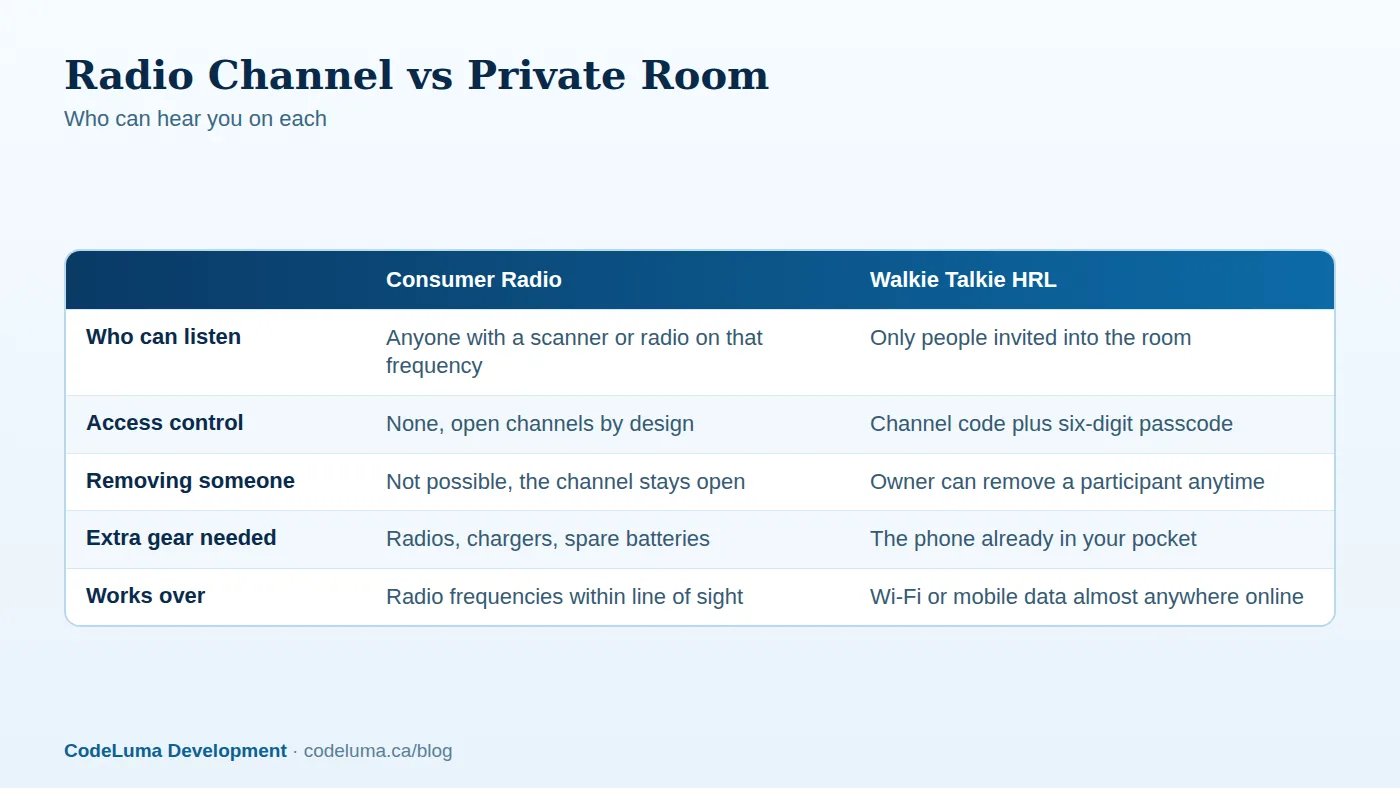
Most off-the-shelf walkie-talkies, the kind used on job sites, campgrounds and school trips, transmit on shared public frequency bands. That's part of how they're built to work without a license or a subscription: everyone's radio talks over the same limited set of channels, and anything you say on one of them can be received by any radio, or any scanner, tuned to that same channel within range. There's no login, no password and no way to lock a stranger out. The openness is a feature for casual, low-stakes chatter, but it's also the whole story on privacy: there isn't any, by design.
What a Scanner Can Actually Hear
A scanner is simply a receiver built to sweep across many frequencies and stop on active ones. Hobbyists, neighbors, and anyone curious with the right device can listen in on ordinary radio traffic without needing permission or even being noticed. If your channel carries a delivery address, a security patrol route, a family's location for the afternoon, or details about who's home and who isn't, that information is available to anyone within range who happens to be listening. It isn't hacking. It's just how open radio frequencies work.
Who's Listening, and Why It Matters
Imagine a security team at a large venue coordinating over a basic radio channel, calling out which doors are unlocked and where staff are stationed. Or imagine a family on a road trip using radios to share when they'll arrive and where they're staying. Neither group is doing anything wrong, but neither realizes their channel is open to anyone nearby who's curious enough to listen. The risk isn't dramatic most of the time. It's the quiet accumulation of details, locations, schedules, names, that a channel broadcasts to whoever happens to be tuned in.
The Phone-Based Alternative: Encrypted in Transit
Walkie Talkie HRL takes a different path. Instead of broadcasting over open radio frequencies, it sends voice over the internet connection your phone already has, using Wi-Fi or mobile data. That voice is encrypted in transit, meaning it's scrambled as it travels between your phone and the service, rather than sent as an open broadcast anyone nearby can pick up with a scanner. It's worth being precise here: encrypted in transit is not the same as end-to-end encryption, and no online communication system, this one included, can promise absolute, airtight security. What it does mean is that your voice isn't simply floating in the air on a public frequency for any receiver to catch. For more detail on what that distinction means in practice, see Encrypted in Transit: What It Means for a Walkie-Talkie App.
What a Private Room Adds
On top of encryption in transit, private channels add a layer that consumer radios simply can't offer: access control. A private room uses a unique channel code plus a six-digit passcode, so only people who have both can join. The room's owner can also remove someone at any time, instantly cutting off their access. Some supported private plans allow up to 100 participants, which is plenty for a large crew, an extended family, or a full event staff, all without anyone outside the room able to listen in the way they could on an open radio frequency.
Good Habits for Keeping a Room Private
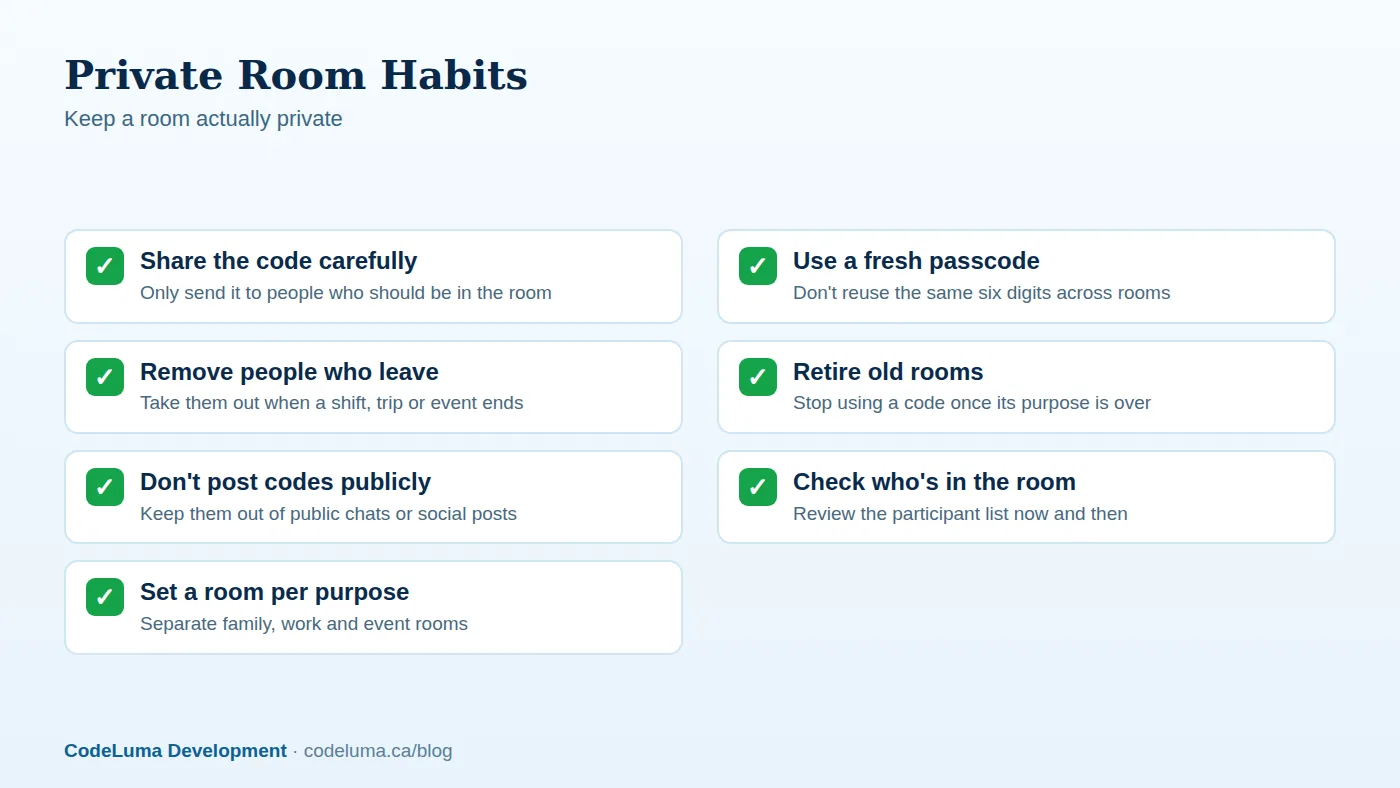
A private room is only as private as the habits around it. Share the channel code and passcode only with people who genuinely need to be there, not in a group chat that might get forwarded or a public post that anyone could screenshot. Avoid reusing the same six-digit passcode across different rooms; a fresh code for each purpose limits what's exposed if one code ever gets shared too widely. When someone's role ends, whether it's a contractor finishing a job or a relative's visit wrapping up, remove them from the room rather than leaving the door open indefinitely. And periodically check who's actually in a room you manage, since membership tends to drift over time.
Setting Up a Private Room in Minutes
Getting a private room running doesn't take long. Install the app on the device you already carry, whether that's an Android phone or tablet, an iPhone added as a web app to your Home Screen, or a Big Screen app on a TV or Chromebook for a shared space like a security office. Create your account with an email, a unique username and a six-digit PIN. Then set up a room with its own channel code and passcode, and share both only with the people who belong in it. From there, it's hold to talk, release to listen, the same simple rhythm as a traditional radio, just carried over the internet instead of an open frequency. Walk through the full process in how it works, or see Create Your First Private Walkie Talkie Room in Minutes for a step-by-step guide.

Comparing the Two Approaches
Traditional radios have real strengths: they don't depend on an internet connection, and many people already know how to use one. But that independence comes with a tradeoff, since anyone with a scanner on the right frequency can listen. Phone-based push-to-talk flips that tradeoff. It needs an internet path, over Wi-Fi or mobile data, to work at all, but in exchange it offers encryption in transit and access-controlled private rooms, plus the simple fact that there's nothing extra to buy, charge or carry beyond the phone already in your pocket.
Common Mistakes to Avoid
- Assuming a quiet channel means a private one. Not hearing anyone else doesn't mean no one else is listening.
- Sharing sensitive details over open radio frequencies. Addresses, schedules and access details are better suited to a controlled channel.
- Reusing the same passcode everywhere. A single leaked code shouldn't expose every room you run.
- Forgetting to remove people from a room. Access should end when someone's reason for being there does.
- Treating any communication tool as an emergency service. Neither traditional radios nor this app replace 911 or dedicated emergency systems.
Who This Matters Most For
Security teams coordinating patrol routes and access points benefit from a channel that isn't broadcasting locations to anyone nearby with a scanner. Families sharing pickup times, addresses and check-ins get more peace of mind from a trusted family room than an open radio frequency. Event crews and construction teams juggling schedules and equipment status often prefer a channel only their own people can hear. In each case, the underlying question is the same: does this conversation belong somewhere anyone within range can listen, or somewhere only invited people can?
Wrap-Up
Consumer walkie-talkies aren't broken, but they were built for open, casual chatter, not for private coordination. A scanner can hear whatever's said on a typical shared frequency, and there's no way to change that after the fact. If some of what you say needs to stay among a chosen group, a phone-based option with encryption in transit and access-controlled private rooms is worth a look, especially since it runs on the device already in your pocket.
Try Walkie Talkie HRL
If some of your conversations shouldn't be available to anyone with a scanner, try a private room in Walkie Talkie HRL on the phone you already carry. Set a channel code and six-digit passcode, invite only the people who belong, and hold to talk in seconds. See {{svc:howto|how it works}} to get started today.
- Private channels - access-controlled rooms with a channel code and six-digit passcode.
- How it works - install, allow audio, join a channel and hold to talk.
- Security teams - patrol, venue and hospital communication.
- Families - trusted rooms for family and caregivers.
Private, instant and already in your pocket. Walkie Talkie HRL turns the phone you already own into a push-to-talk walkie-talkie. Voice is encrypted in transit; no online service can promise absolute security. It is not an emergency-calling service.